Module 8: Observability and Grafana Metrics
Objectives
-
Verify that Multicluster Observability (MCO) is deployed and healthy
-
Explore default RHACM Grafana dashboards across hub and spoke clusters
-
Create custom AMQ Broker alerts using Thanos Ruler
-
Import a custom AMQ Broker Grafana dashboard
-
Compare cross-cluster metrics between hub and SNO edge clusters
-
Use regional MCO Grafana for this hub’s SNOs, and Global Hub Thanos Query for fleet AMQ (not GH compliance Grafana)
Background
Red Hat Advanced Cluster Management includes a Multicluster Observability (MCO) addon that aggregates Prometheus metrics from all managed clusters into a central Thanos/Grafana stack on the hub. This deployment uses Google Cloud Storage (GCS) as the Thanos backend for long-term metric retention.
MCO is per regional ACM hub. This Grafana sees east only (local-cluster plus SNOs you joined in Module 2). Global Hub Grafana in Module 7 is compliance (PostgreSQL), not AMQ. Fleet AMQ is an extra Thanos Query on Global Hub whose stores are the three regional Thanos Query gRPC endpoints (passthrough + mTLS; fill fleetThanosQuery.regionalStores after the regionals exist).
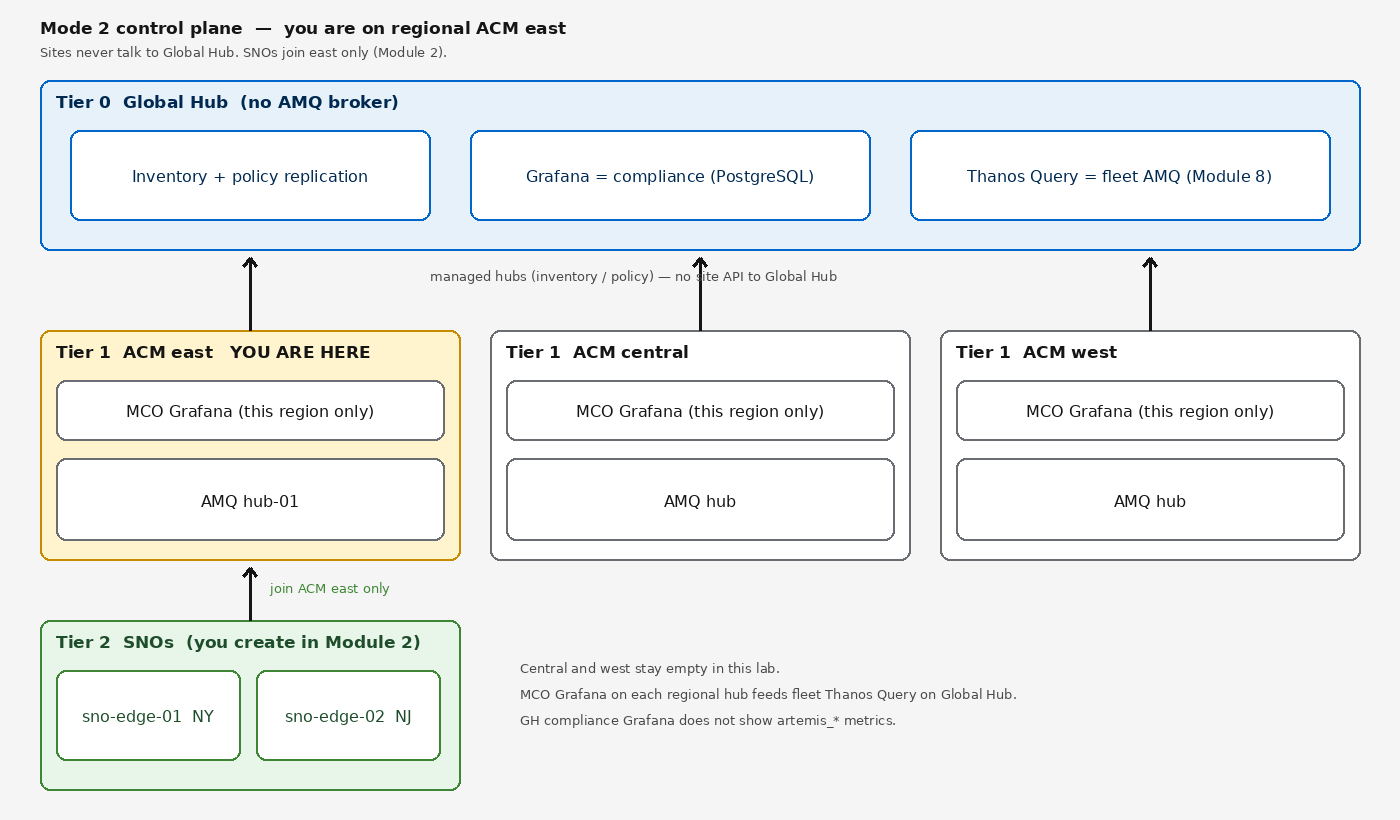
MCO was deployed automatically during cluster provisioning via an AgnosticD workload role (ocp4_workload_rhacm_observability_gcs). In this module you will verify the deployment, explore built-in dashboards, and build custom alerting and dashboards for AMQ Broker.
Prerequisites
Verify RHACM is running:
oc get mch -A -o custom-columns=NAME:.metadata.name,STATUS:.status.phaseNAME STATUS
multiclusterhub RunningSteps
1. Verify MCO Deployment
Check that the MultiClusterObservability CR is healthy:
oc get multiclusterobservability observability -o jsonpath='{.status.conditions[?(@.type=="Ready")].status}'
echo ""TrueVerify all MCO pods are running:
oc get pods -n open-cluster-management-observability --no-headers | wc -l
echo "pods total"
oc get pods -n open-cluster-management-observability --no-headers | grep -v Running | grep -v Completed || echo "All pods healthy"| A healthy MCO deployment has approximately 30-35 pods including Thanos components, Grafana replicas, alertmanager, and metrics collectors. |
Verify the GCS-backed Thanos object storage secret exists:
oc get secret thanos-object-storage -n open-cluster-management-observability -o jsonpath='{.data.thanos\.yaml}' | base64 -d | head -3type: GCS
config:
bucket: ...2. Explore Default Grafana Dashboards
Get the Grafana URL:
echo "https://$(oc get route grafana -n open-cluster-management-observability -o jsonpath='{.spec.host}')"Open the URL in your browser. Grafana uses OpenShift authentication — log in with your cluster credentials.
Grafana uses OpenShift OAuth. Log in with admin / your cluster admin password, or with your user1 credentials.
|
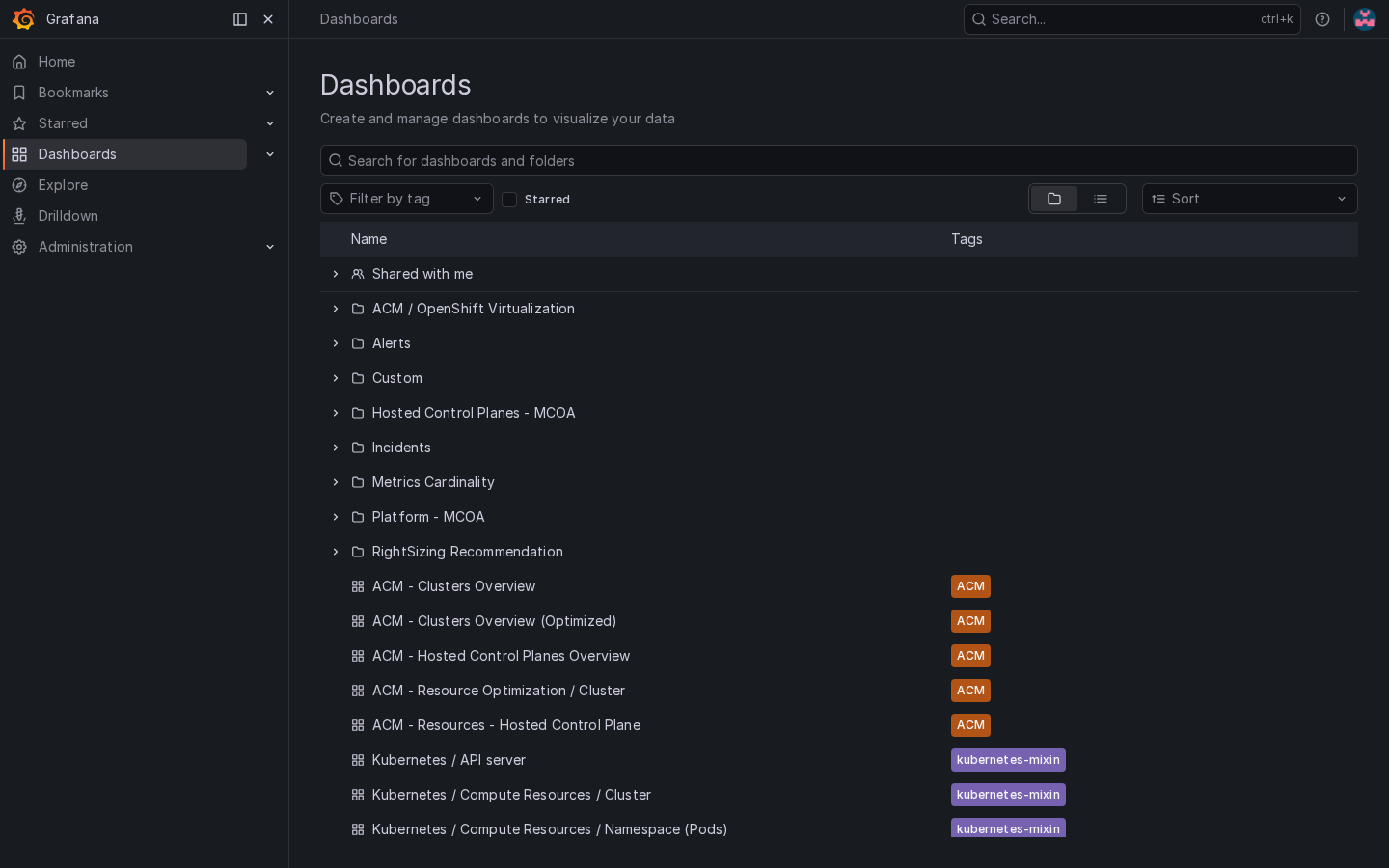
Explore the built-in dashboards under Dashboards:
-
ACM - Clusters Overview: memory utilization, CPU usage, and etcd database size per cluster
-
ACM - Resource Optimization: resource requests vs actual usage across managed clusters
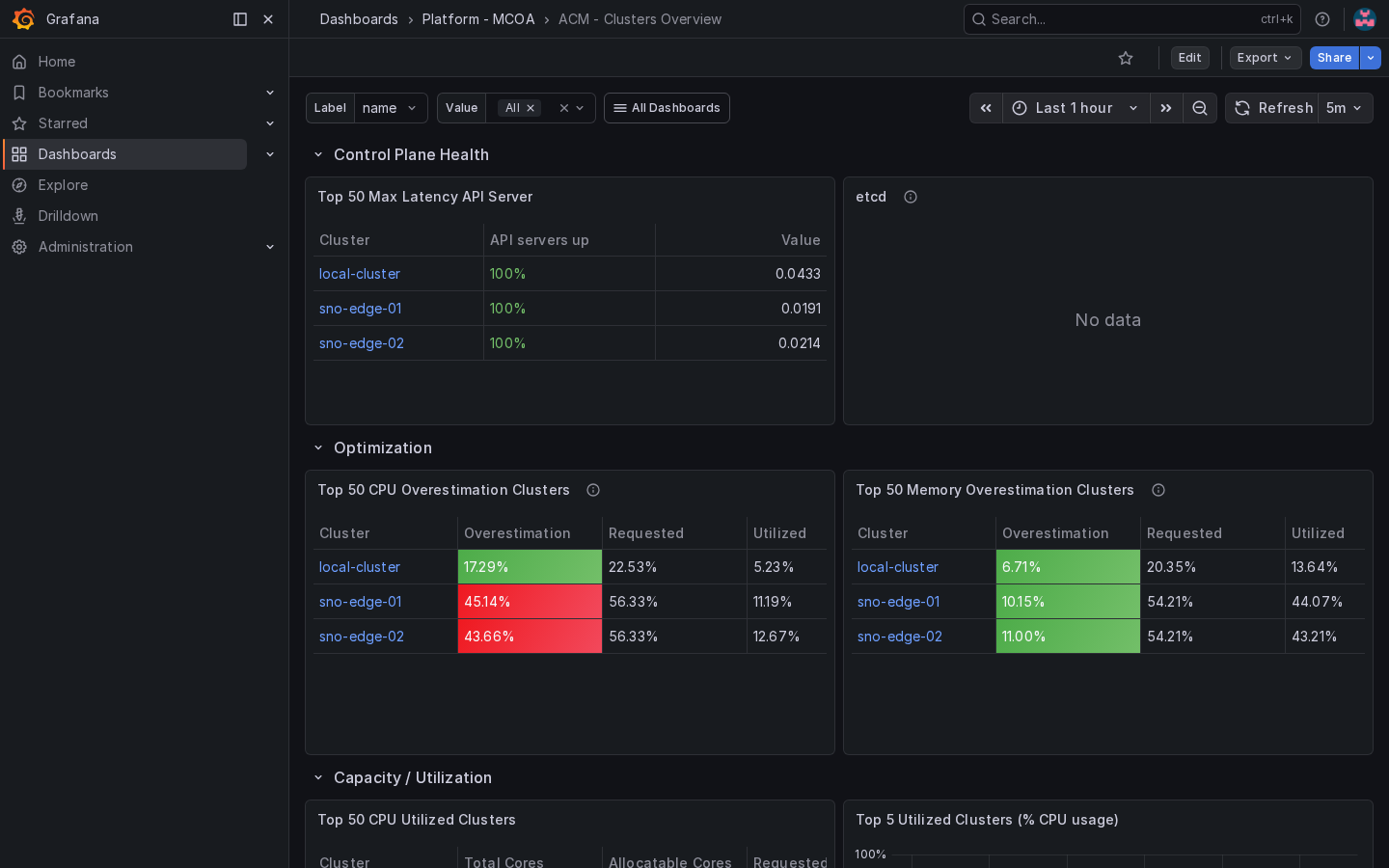
With your SNO spoke clusters joined, you can compare metrics across:
-
local-cluster(this regional ACM hub) -
sno-edge-01(NY edge) -
sno-edge-02(NJ edge)
3. Verify Metrics Collection
Check that the metrics collector is running on the hub:
oc get pods -n open-cluster-management-observability -l component=metrics-collectorCheck that endpoint-monitoring addons are enabled on spoke clusters:
oc get managedclusteraddon -A -l component=addon-agent | grep observabilityVerify ServiceMonitors are collecting AMQ Broker metrics:
oc get servicemonitor -n artemis 2>/dev/null || echo "ServiceMonitor resources will appear after AMQ Broker is deployed"4. Create Custom AMQ Broker Alerts
Switch to the Grafana Explore page (compass icon in the left sidebar). Click the Builder / Code toggle and switch to Code mode so you can paste PromQL expressions.
4.1. Verify AMQ Broker Metrics Are Available
Run this query to check that AMQ Broker metrics are being collected:
artemis_message_countYou should see results from the regional AMQ hub (cluster="local-cluster") and SNO brokers (cluster="sno-edge-01" / sno-edge-02). Helm ships ConfigMap observability-metrics-custom-allowlist in open-cluster-management-observability with both metrics_list.yaml and uwl_metrics_list.yaml — hub AMQ is scraped by user-workload Prometheus, so the UWL list is required or Explore stays empty.
SNO AMQ ServiceMonitors are also user-workload: the default spoke metrics-collector federates platform Prometheus (prometheus-k8s), which does not scrape the artemis namespace. Policy policy-sno-uwl-amq-metrics sets enableUserWorkload: true on each SNO (merged into openshift-monitoring/cluster-monitoring-config so ACM alert-forwarding is preserved) and creates a spoke observability-metrics-custom-allowlist in artemis. That starts uwl-metrics-collector so SNO artemis_* series reach Thanos and appear in the AMQ dashboard cluster dropdown.
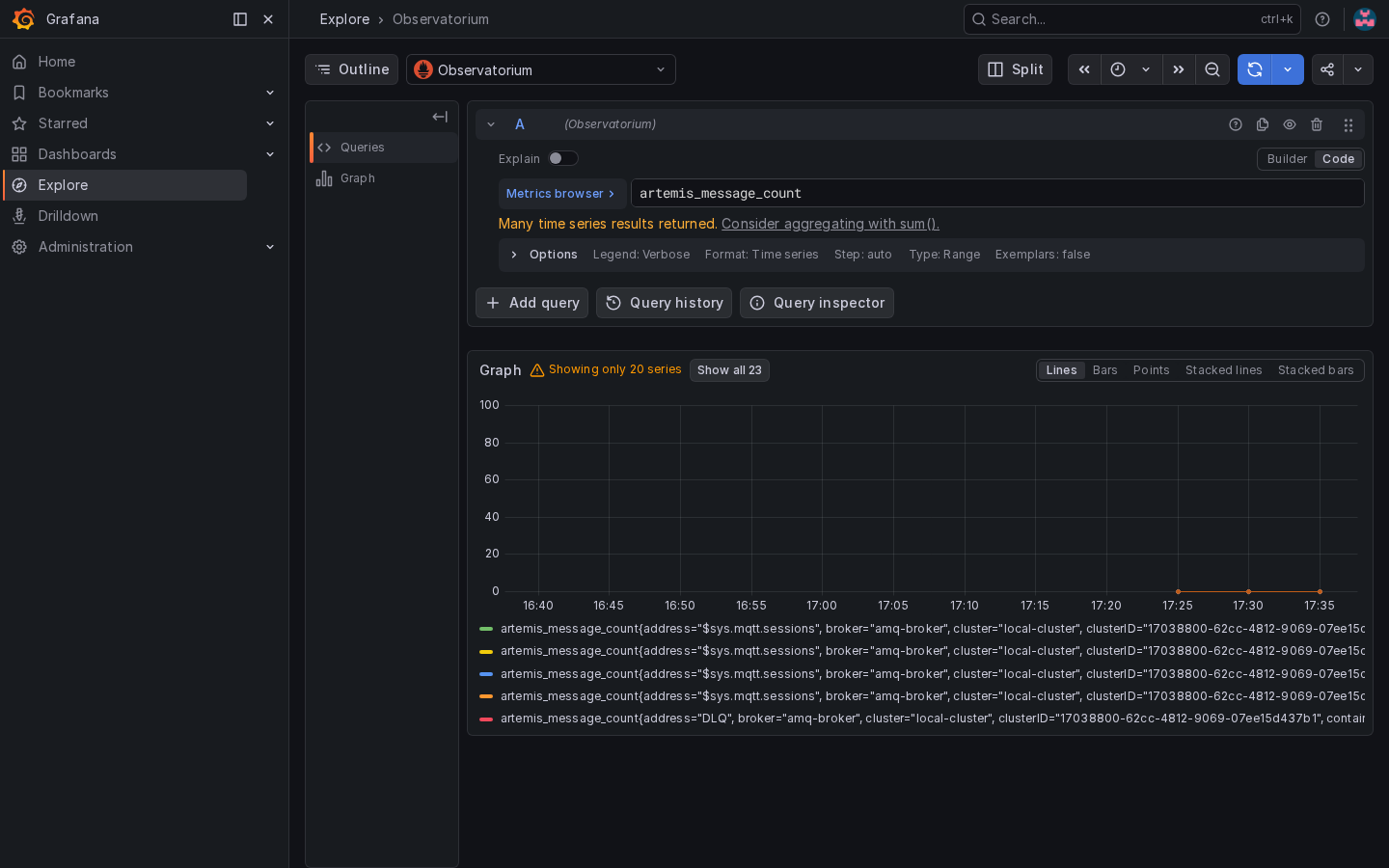
artemis_message_count4.2. Deploy Custom Alert Rules
Create a ConfigMap with custom alert rules for AMQ Broker monitoring:
cat <<'EOF' | oc apply -f -
apiVersion: v1
kind: ConfigMap
metadata:
  name: thanos-ruler-custom-rules
  namespace: open-cluster-management-observability
data:
  custom_rules.yaml: |
    groups:
      - name: amq-broker-health
        rules:
        - alert: BrokerQueueDepthHigh
          annotations:
            summary: "AMQ Broker queue depth exceeds 1000 messages"
            description: "Queue {{ $labels.queue }} on broker {{ $labels.broker }} in cluster {{ $labels.cluster }} has {{ $value }} messages."
          expr: |
            artemis_message_count > 1000
          for: 2m
          labels:
            severity: warning
        - alert: BrokerMemoryUsageHigh
          annotations:
            summary: "AMQ Broker address memory usage exceeds 80%"
            description: "Broker {{ $labels.broker }} in cluster {{ $labels.cluster }} is using {{ $value | humanize }}B of address memory."
          expr: |
            artemis_address_memory_usage > 800000000
          for: 5m
          labels:
            severity: critical
EOF5. Create Custom AMQ Broker Dashboard
Apply a custom Grafana dashboard for AMQ Broker monitoring. The dashboard is deployed as a ConfigMap:
cat <<'DASHBOARD_EOF' | oc apply -f -
apiVersion: v1
kind: ConfigMap
metadata:
  name: artemis-amq-broker-dashboard
  namespace: open-cluster-management-observability
  labels:
    grafana-custom-dashboard: "true"
data:
  artemis-broker.json: |
    {
      "annotations": {"list": []},
      "editable": true,
      "fiscalYearStartMonth": 0,
      "graphTooltip": 0,
      "id": null,
      "links": [],
      "panels": [
        {
          "title": "Queue Message Counts",
          "type": "timeseries",
          "gridPos": {"h": 8, "w": 12, "x": 0, "y": 0},
          "targets": [{"expr": "artemis_message_count{cluster=~\"$cluster\"}", "legendFormat": "{{cluster}} / {{broker}} / {{queue}}"}],
          "datasource": {"type": "prometheus", "uid": "Observatorium"}
        },
        {
          "title": "Messages Added & Acked",
          "type": "timeseries",
          "gridPos": {"h": 8, "w": 12, "x": 12, "y": 0},
          "targets": [
            {"expr": "rate(artemis_messages_added{cluster=~\"$cluster\"}[5m])", "legendFormat": "added: {{cluster}} / {{broker}}"},
            {"expr": "rate(artemis_messages_acknowledged{cluster=~\"$cluster\"}[5m])", "legendFormat": "acked: {{cluster}} / {{broker}}"}
          ],
          "datasource": {"type": "prometheus", "uid": "Observatorium"}
        },
        {
          "title": "Connection Count",
          "type": "timeseries",
          "gridPos": {"h": 8, "w": 12, "x": 0, "y": 8},
          "targets": [{"expr": "artemis_connection_count{cluster=~\"$cluster\"}", "legendFormat": "{{cluster}} / {{broker}}"}],
          "datasource": {"type": "prometheus", "uid": "Observatorium"}
        },
        {
          "title": "Address Memory Usage",
          "type": "timeseries",
          "gridPos": {"h": 8, "w": 12, "x": 12, "y": 8},
          "targets": [{"expr": "artemis_address_memory_usage{cluster=~\"$cluster\"}", "legendFormat": "{{cluster}} / {{broker}}"}],
          "datasource": {"type": "prometheus", "uid": "Observatorium"},
          "fieldConfig": {"defaults": {"unit": "bytes"}}
        },
        {
          "title": "Consumer Count",
          "type": "timeseries",
          "gridPos": {"h": 8, "w": 24, "x": 0, "y": 16},
          "targets": [{"expr": "artemis_consumer_count{cluster=~\"$cluster\"}", "legendFormat": "{{cluster}} / {{broker}} / {{address}}"}],
          "datasource": {"type": "prometheus", "uid": "Observatorium"}
        }
      ],
      "schemaVersion": 39,
      "tags": ["artemis", "amq-broker", "custom"],
      "templating": {
        "list": [
          {
            "name": "cluster",
            "type": "query",
            "datasource": {"type": "prometheus", "uid": "Observatorium"},
            "query": "label_values(artemis_message_count, cluster)",
            "includeAll": true,
            "multi": true,
            "current": {"selected": true, "text": "All", "value": "$__all"}
          }
        ]
      },
      "time": {"from": "now-1h", "to": "now"},
      "title": "AMQ Broker - Artemis Edge",
      "uid": "artemis_amq_broker_acm"
    }
DASHBOARD_EOF
After applying, navigate to Grafana → Dashboards → Custom folder. The AMQ Broker - Artemis Edge dashboard should appear. The Helm chart may already have deployed this dashboard; the apply below is idempotent if the ConfigMap name matches. Each series legend includes cluster so hub (local-cluster) and SNO brokers are distinguishable when multiple clusters are selected.
Use the Cluster dropdown at the top to filter one node at a time. The screenshots below are the same dashboard with that filter set to the hub, then each SNO — that is how you tell which node the series come from.
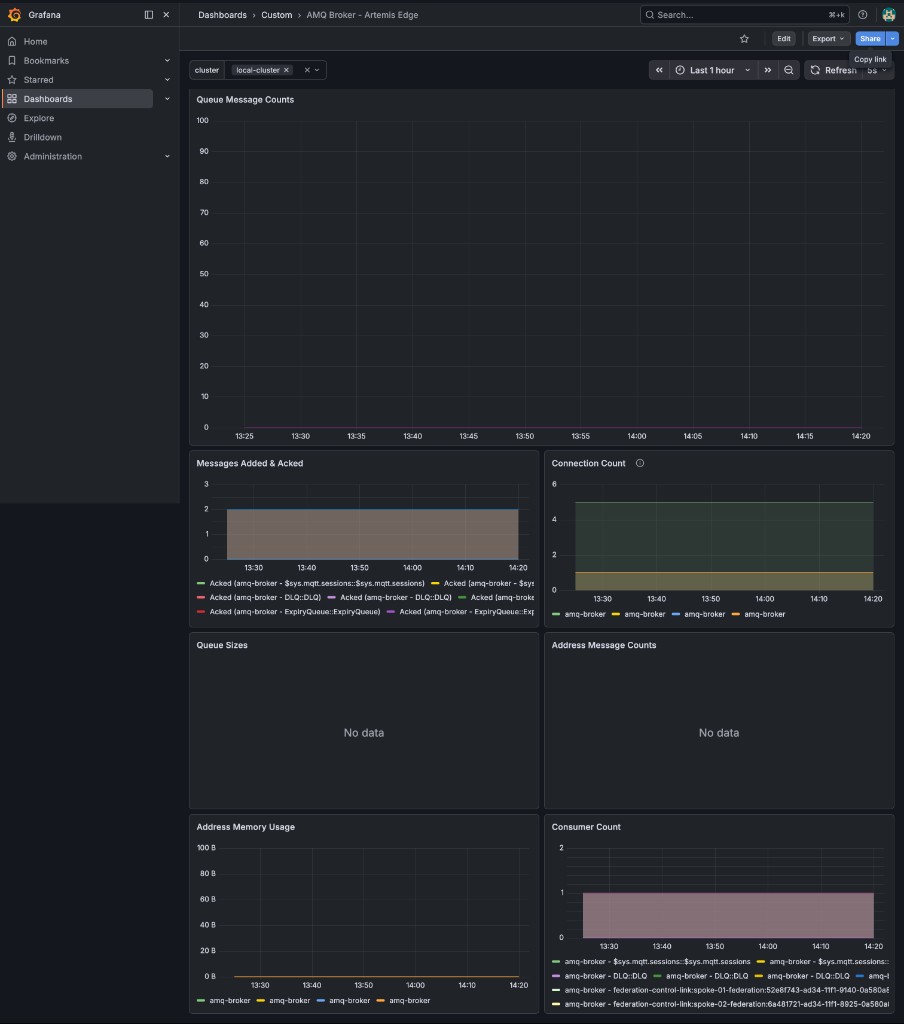
local-cluster)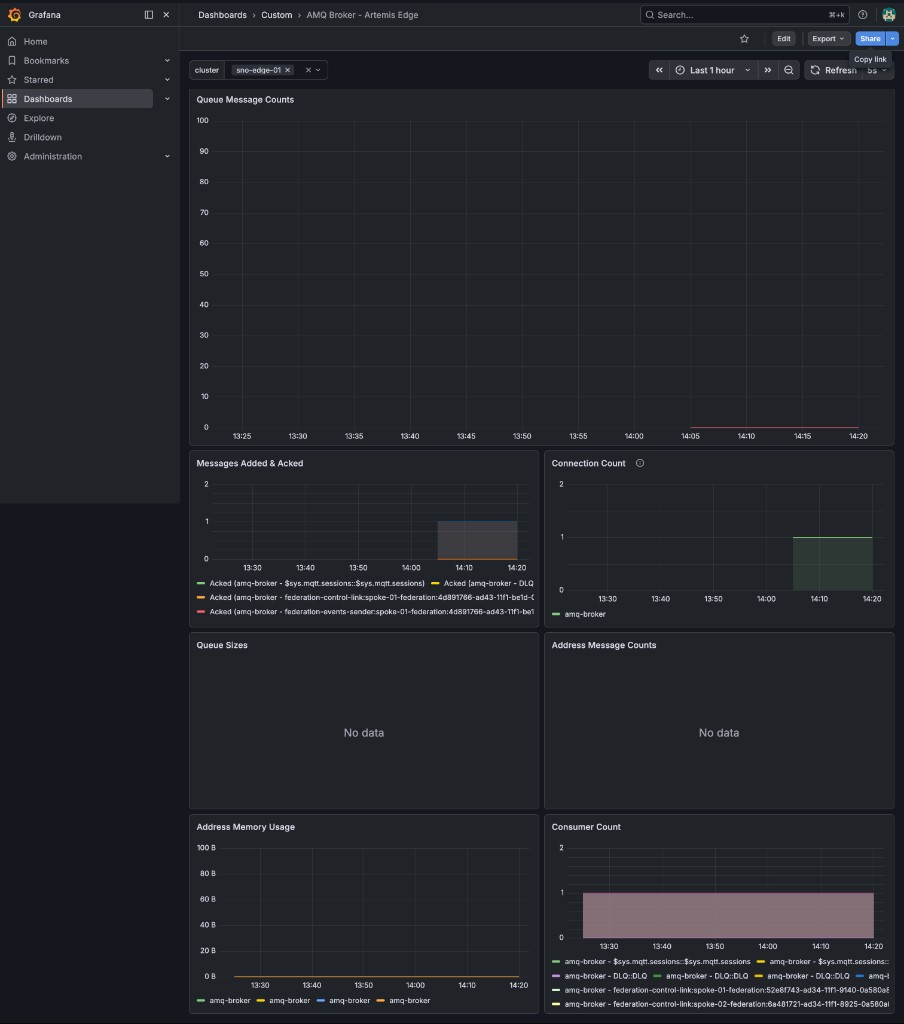
sno-edge-01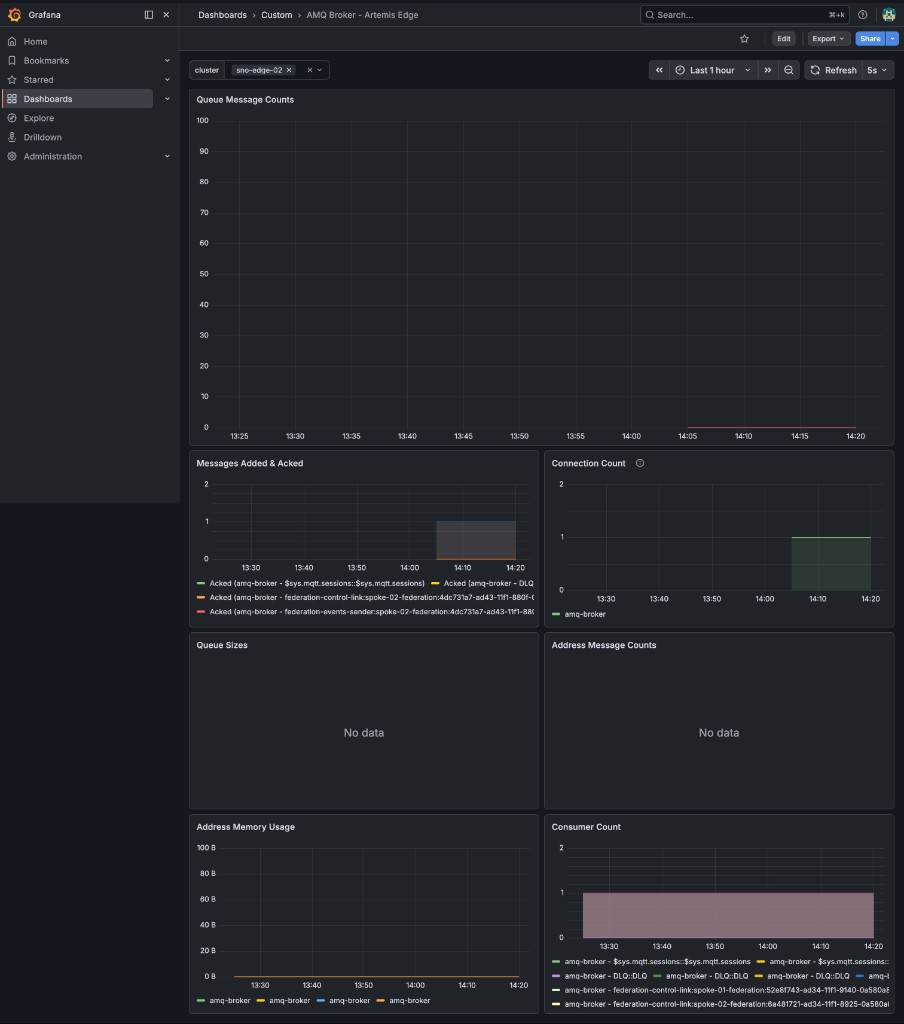
sno-edge-02The dropdown values on this regional Grafana are local-cluster, sno-edge-01, and sno-edge-02. For all three regions at once, use Global Hub Thanos Query (not Module 7 compliance Grafana).
The dashboard has 5 panels:
| Panel | Metric |
|---|---|
Queue Message Counts |
|
Messages Added & Acked |
|
Connection Count |
|
Address Memory Usage |
|
Consumer Count |
|
6. Cross-Cluster Observability
With MCO deployed, the endpoint-observability-operator automatically deploys a metrics-collector on each managed cluster.
Verify metrics are being collected from the hub:
oc get pods -n open-cluster-management-observability -l component=metrics-collectorIn Grafana Explore, compare broker metrics across clusters:
artemis_connection_countFilter by specific clusters:
-
{cluster="local-cluster"}— regional AMQ hub (hub-01) metrics -
{cluster="sno-edge-01"}— NY edge metrics (once AMQ Broker is deployed via policy) -
{cluster="sno-edge-02"}— NJ edge metrics
7. Correlate with Messaging Activity
-
Go back to the Showroom terminal and produce 100 messages (see Module 5)
-
Watch the Queue Message Counts panel spike for the target queue
-
Switch to Connection Count to see federation connections
-
Check Address Memory Usage to ensure you are within the 1GiB global max
Next
Official AMQ and ACM articles for the URLs and policies in this lab are on the References page.