Artemis Edge ACM Demo
Overview
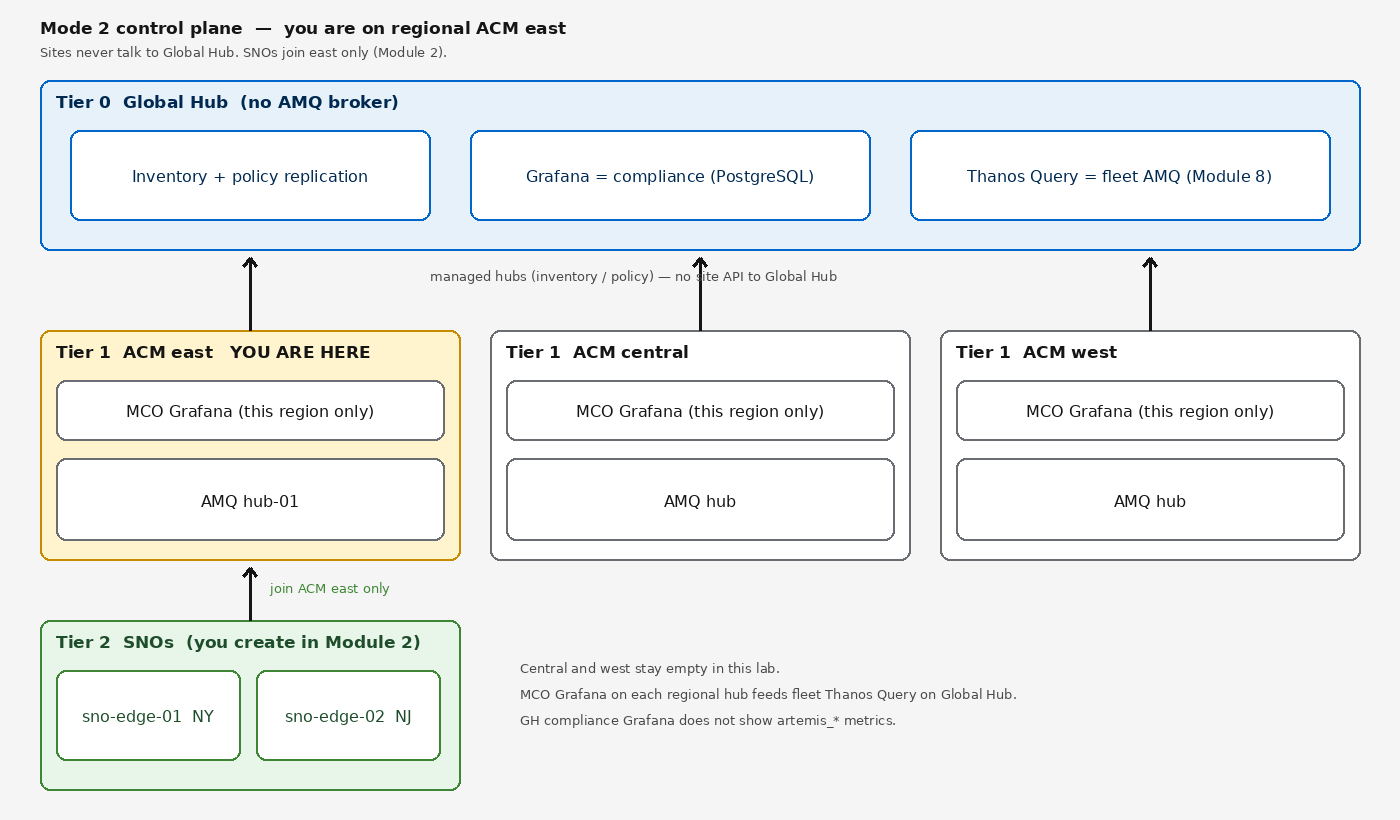
This demo is Mode 2: a hub-of-hubs control plane plus regional AMQ. You log into regional ACM east. Site brokers on SNOs federate to the AMQ hub (hub-01 on this cluster) using address classes 5603–5607. Global Hub is inventory and compliance only — no AMQ broker, and sites never talk to it.
Architecture
You are on a Tier 1 regional ACM hub (east). AgnosticD already created Tier 0 Global Hub plus three regional ACM hubs. You create Tier 2 SNOs in Module 2. Sites never talk to Global Hub.
| Term | Meaning |
|---|---|
ACM hub |
This cluster — regional ACM east ( |
AMQ hub |
Broker |
Global Hub |
Tier 0 inventory and policy compliance only |
Site |
A SNO you join in Module 2. Sites never talk to Global Hub. |
Deployment Mode
You are running Mode 2: 1 Global Hub + 3 regional ACM hubs (east/central/west). This terminal is the east regional hub. SNOs are not present until Module 2.
Getting Started
Open the Terminal 1 tab on the right and log in to your OpenShift cluster:
oc login --insecure-skip-tls-verify=true -u user1 -p '(workshop password)' https://api.hub.example.gcp.redhatworkshops.io:6443Verify you are logged in:
oc whoamiYou should see user1. You now have read access to all cluster resources used in this demo.
Your credentials are user1 / (workshop password). The OpenShift Web Console is available at Console ↗.
|
Console Links
| Component | URL |
|---|---|
AMQ Console (regional AMQ hub) |
https://hub-01-broker-wconsj-0-svc-rte-artemis.apps.hub.example.gcp.redhatworkshops.io |
Keycloak Admin |
https://keycloak-ingress-keycloak.apps.hub.example.gcp.redhatworkshops.io |
Grafana (this region’s MCO) |
https://grafana-open-cluster-management-observability.apps.hub.example.gcp.redhatworkshops.io |
RHACM Console (this ACM hub) |
https://console-openshift-console.apps.hub.example.gcp.redhatworkshops.io/multicloud/home/overview |