Verify Hub-of-Hubs Control Plane (Mode 2)
Objectives
-
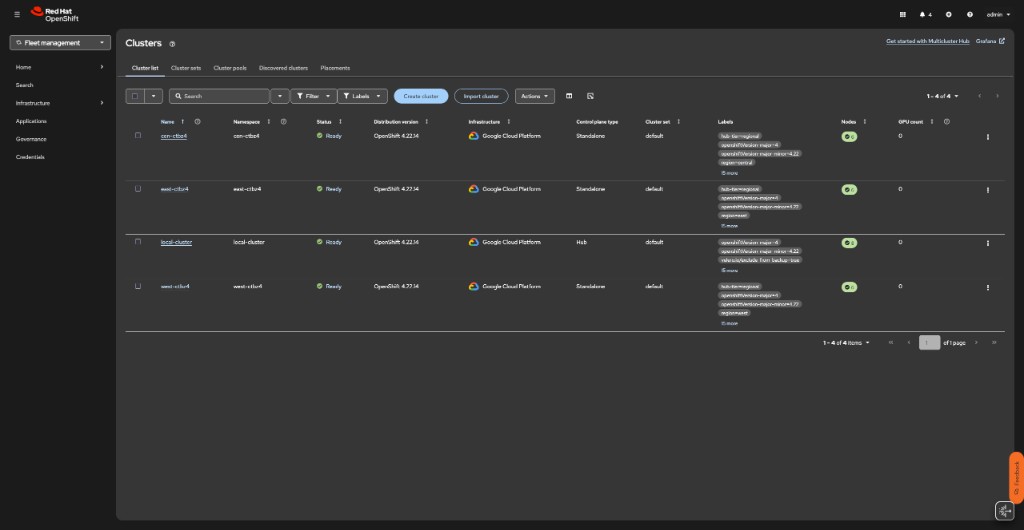
Confirm all three regional hubs are imported as ManagedClusters on Global Hub
-
Verify the fleet ArgoCD ApplicationSet is pushing config to each regional hub
-
Confirm the Multicluster Global Hub Operator is running
-
Understand what lives on each tier before students begin
| These commands run against the Global Hub cluster. You will log in with your workshop credentials — the same username/password you use on the regional hub, but against a different API endpoint. |
Background
AgnosticD provisions four independent OpenShift clusters. The import-managed-hubs.sh post-provision script creates ManagedCluster + auto-import-secret + KlusterletAddonConfig on the Global Hub for each regional hub. Once imported, the hubs ApplicationSet on Global Hub’s ArgoCD detects the new clusters (label hub-tier: regional) and pushes per-region config overlays.
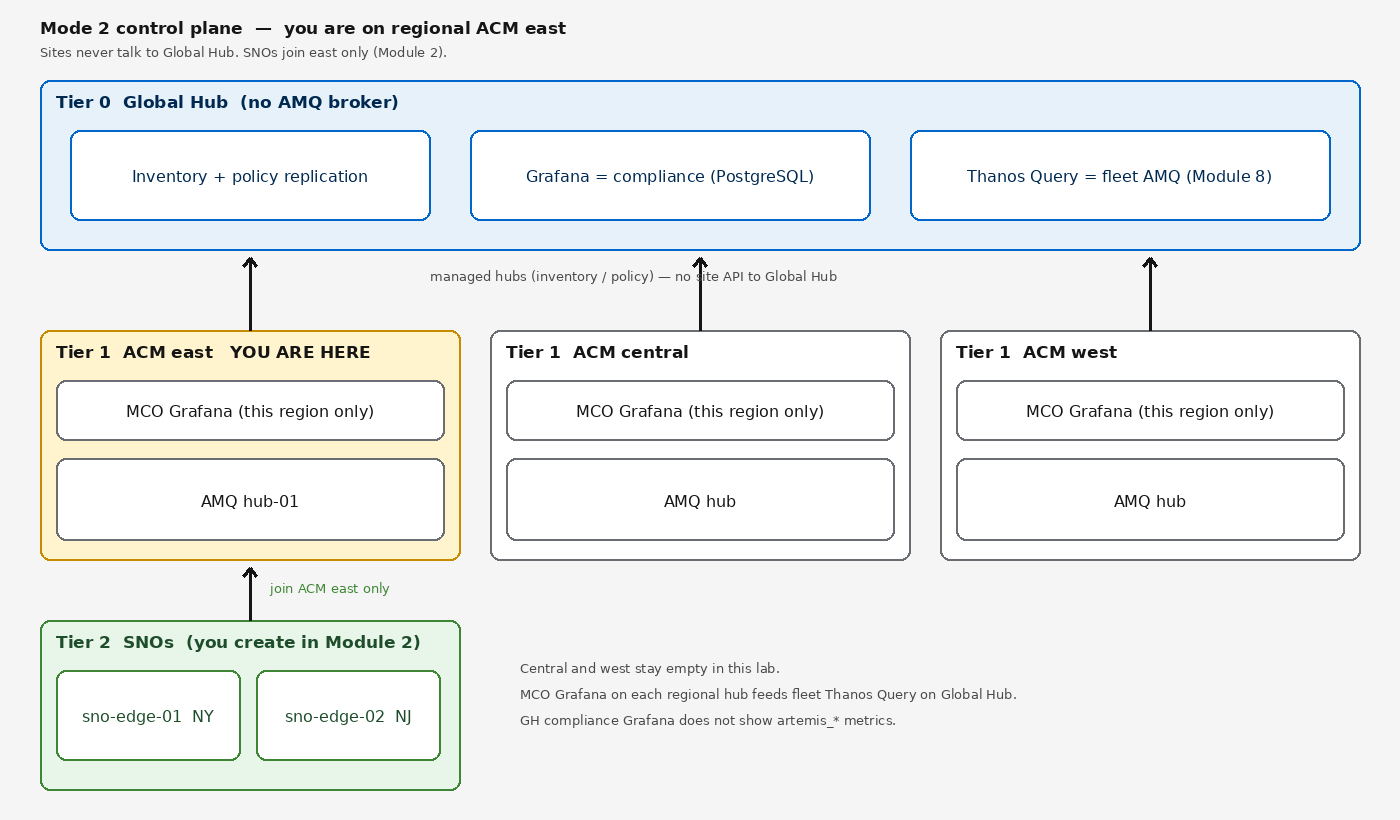
| Tier | Cluster | Components |
|---|---|---|
Tier 0 — Global Hub |
|
RHACM, Multicluster Global Hub Operator, fleet ArgoCD ( |
Tier 1 — Regional Hub |
|
RHACM, ArgoCD ( |
Tier 2 — Edge SNO |
|
AMQ Broker (1 per region), AMQP federation to regional hub-01. Provisioned in Module 2. |
Prerequisites
Log in to the Global Hub cluster using your workshop credentials:
oc login --insecure-skip-tls-verify=false -u user1 -p {global_hub_password} {global_hub_api_url}
Your Showroom terminal is logged in to the regional hub by default. The commands in this module target the Global Hub — a separate cluster. After completing this module, log back in to your regional hub with oc login --insecure-skip-tls-verify=true -u user1 -p '(workshop password)' https://api.hub.example.gcp.redhatworkshops.io:6443 before continuing to Module 1.
|
Steps
1. Verify Regional Hubs Are Imported as ManagedClusters
oc get managedclustersNAME HUB ACCEPTED MANAGED CLUSTER URLS JOINED AVAILABLE AGE
cen-<sandbox> true https://api.hub-central.<sandbox>.gcp.redhatworkshops.io:6443 True True ...
east-<sandbox> true https://api.hub-east.<sandbox>.gcp.redhatworkshops.io:6443 True True ...
local-cluster true https://api.hub.<sandbox>.gcp.redhatworkshops.io:6443 True True ...
west-<sandbox> true https://api.hub-west.<sandbox>.gcp.redhatworkshops.io:6443 True True ...Each regional hub should show JOINED=True and AVAILABLE=True. local-cluster is the Global Hub itself. If any hub shows AVAILABLE=Unknown, check the MCE hypershift-addon status on that hub.
NAME            HUB ACCEPTED   MANAGED CLUSTER URLS                                        JOINED   AVAILABLE   AGE
cen-ctbz4       true           https://api.hub-central.ctbz4.gcp.redhatworkshops.io:6443   True     True        11m
east-ctbz4      true           https://api.hub-east.ctbz4.gcp.redhatworkshops.io:6443      True     True        11m
local-cluster   true           https://api.hub.ctbz4.gcp.redhatworkshops.io:6443           True     True        17h
west-ctbz4      true           https://api.hub-west.ctbz4.gcp.redhatworkshops.io:6443      True     True        11m
Verify the labels that the hubs ApplicationSet selector uses:
oc get managedcluster -l hub-tier=regional -o custom-columns=NAME:.metadata.name,REGION:.metadata.labels.region,TIER:.metadata.labels.hub-tierNAME REGION TIER
cen-<sandbox> central regional
east-<sandbox> east regional
west-<sandbox> west regional2. Verify the Hubs ApplicationSet
The hubs ApplicationSet uses a clusters generator with the label selector hub-tier: regional. It creates one hub-config-<name> Application per regional hub, pushing the overlay from fleet-gitops/hubs/overlays/<region>/.
oc get applicationsets.argoproj.io -n openshift-gitopsNAME AGE
hubs ...3. Verify Hub-Config Applications Are Synced
oc get applications.argoproj.io -n openshift-gitopsNAME SYNC STATUS HEALTH STATUS
field-content Synced Healthy
fleet-gitops Synced Healthy
hub-config-cen-<sandbox> Synced Healthy
hub-config-east-<sandbox> Synced Healthy
hub-config-west-<sandbox> Synced Healthy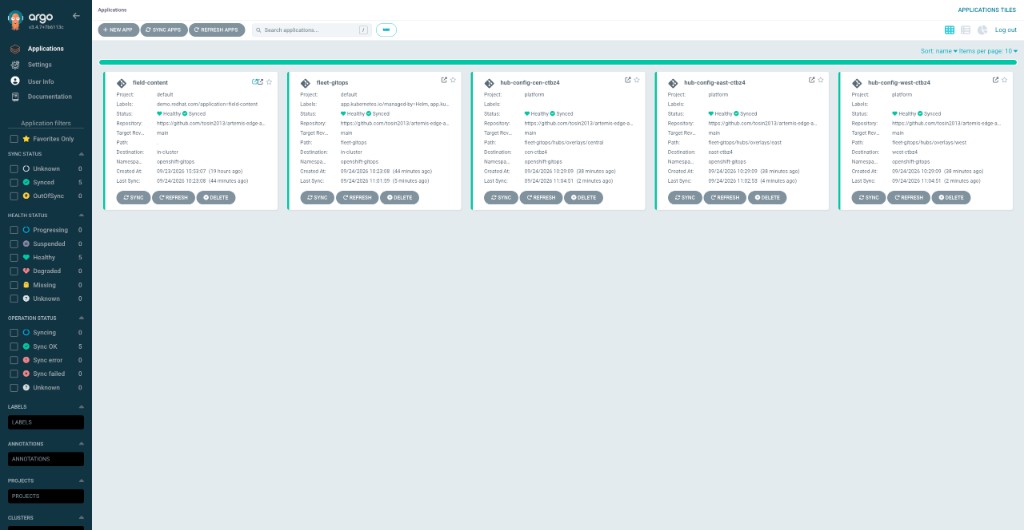
-
field-contentis the Global Hub’s own Helm chart (operators, Keycloak, observability ConfigMaps, RBAC). -
fleet-gitopsdeploys the fleet Kustomize tree (AppProject,hubsApplicationSet, RHACM Policies for regional hubs). -
Each
hub-config-*app targets a regional hub via the ACM cluster-proxy. It pushes: AMQ fleet ApplicationSet, AMQ broker operator policy, GitOps operator policy, UWM policy, observability allowlist, and GitOpsCluster registration.
If any hub-config app shows Progressing, check whether the amq-fleet ApplicationSet on that hub is waiting for edge SNOs — that is expected before Module 2.
4. Verify field-content on Global Hub
oc get applications.argoproj.io field-content -n openshift-gitops -o wideConfirm SYNC STATUS = Synced and HEALTH STATUS = Healthy. The field-content app deploys:
-
Multicluster Global Hub Operator subscription and CR
-
Keycloak (RHBK) operator and realm
-
AMQ Broker operator subscription (artemis namespace)
-
Observability ConfigMaps (metrics allowlist, Thanos ruler rules, AMQ dashboard)
-
RBAC (ClusterRoles, workshop user bindings)
5. Verify Multicluster Global Hub Operator
oc get multiclusterglobalhub -n open-cluster-managementNAME STATUS AGE
multiclusterglobalhub Running ...Check the operator subscription is healthy:
oc get subscription.operators.coreos.com multicluster-global-hub-operator-rh -n open-cluster-managementNAME PACKAGE SOURCE CHANNEL
multicluster-global-hub-operator-rh multicluster-global-hub-operator-rh redhat-operators release-1.8The Global Hub Operator aggregates cluster inventory and policy compliance from the three regional ACM hubs into a single view. It does not handle AMQ metrics — that is fleet Thanos Query (Module 8).
6. Verify MCH on Global Hub
oc get multiclusterhub -ANAMESPACE NAME STATUS AGE CURRENTVERSION DESIREDVERSION MESSAGE
open-cluster-management multiclusterhub Running ... 2.17.2 2.17.2 All hub components ready.If STATUS is Pending, check for stuck hypershift-addon:
oc get managedclusteraddon -n local-clusterIf hypershift-addon shows Available=Unknown, it is a known cosmetic issue — all ACM/MCE pods are healthy and the hub is fully functional.
Post-Provision Reference
The hub import was performed by:
./scripts/import-managed-hubs.sh --sandbox <sandbox>This script is idempotent. It:
-
Discovers all
*-<sandbox>hub directories in the agd output -
Skips
global-<sandbox>(the Global Hub itself) -
For each regional hub, creates:
-
ManagedClusterwith labelshub-tier: regional,region: <east|central|west>,vendor: OpenShift -
auto-import-secretcontaining the regional hub’s kubeconfig (triggers ACM auto-import) -
KlusterletAddonConfigenabling all ACM add-ons
-
-
Waits for each hub to reach
JOINED=True
After import completes, the hubs ApplicationSet detects the new clusters and pushes config automatically.
Next Steps
Log back in to your regional hub before continuing:
oc login --insecure-skip-tls-verify=true -u user1 -p '(workshop password)' https://api.hub.example.gcp.redhatworkshops.io:6443Once all checks pass, proceed to Module 1: Verify Hub + RHACM on the regional hub.