Module 0: Access Your Environment
Objectives
-
Log in to the OpenShift cluster from the terminal
-
Verify access to all demo services
-
Understand which credentials to use
You are logging into regional ACM east, not Global Hub. The OpenShift console, AMQ Console, and Grafana on this page belong to this regional hub. Sites you add later never talk to Global Hub.
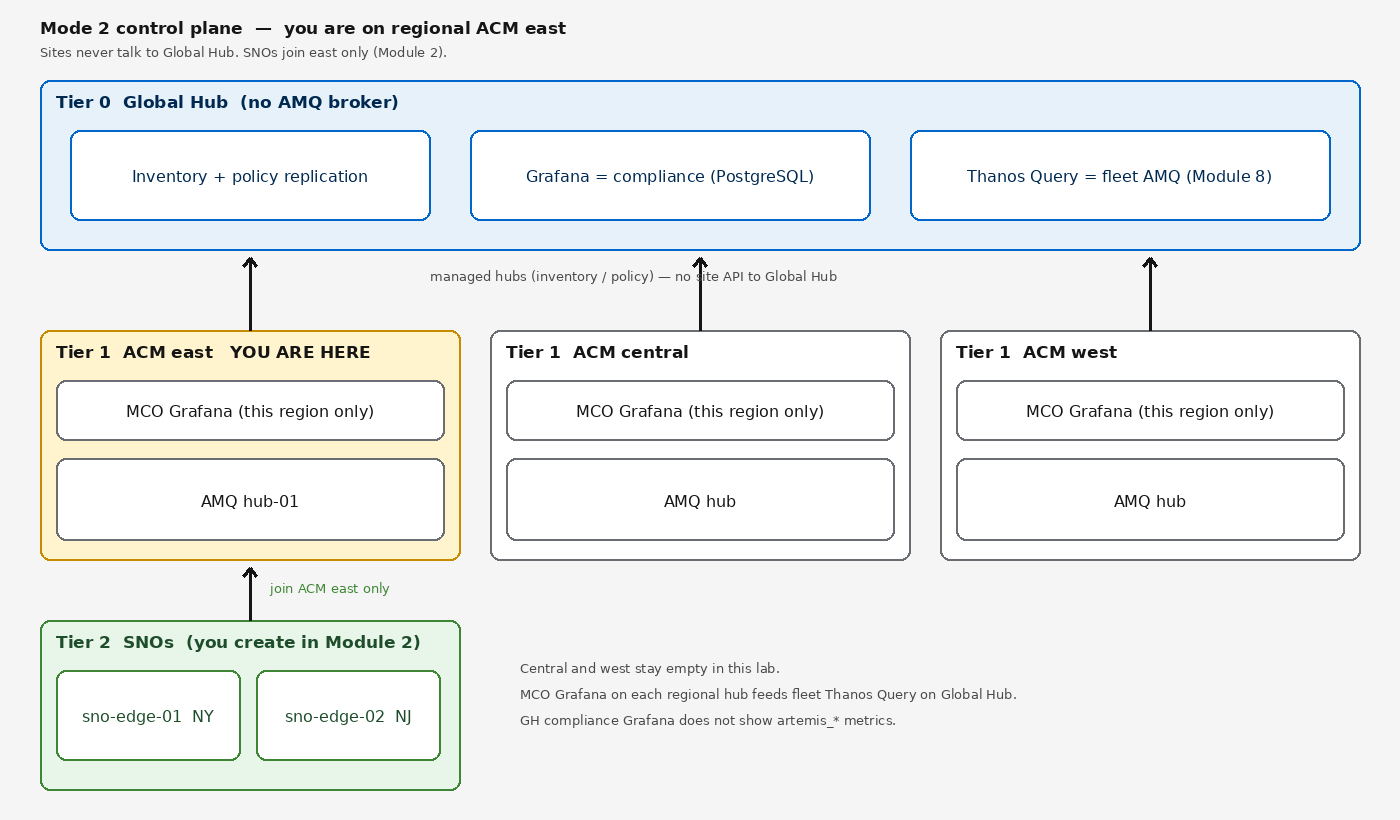
Log In to Your Cluster
Start by logging in to the OpenShift cluster. Run the following command in the Showroom terminal:
oc login --insecure-skip-tls-verify=true -u user1 -p '(workshop password)' https://api.hub.example.gcp.redhatworkshops.io:6443Verify you are logged in:
oc whoamiYou should see your username (e.g. user1).
The Showroom terminal may also have cluster-admin access via a pre-configured service account. The oc login above ensures you are authenticated as your own user.
|
Terminal home directory
The Showroom terminal image sets lab-user home in /etc/passwd to /data, which is not mounted. OpenJDK user.home follows passwd, so export HOME is not enough for Maven. Point the JVM and Maven repo at the writable PVC (/home/lab-user) before any mvn commands (optional Java build in Module 4):
export HOME=/home/lab-user
export MAVEN_USER_HOME=/home/lab-user/.m2
export JAVA_TOOL_OPTIONS="-Duser.home=/home/lab-user"
export MAVEN_OPTS="-Dmaven.repo.local=/home/lab-user/.m2/repository"
mkdir -p /home/lab-user/.m2
Optional: clone the demo repository if you want to inspect or compile the Java clients later. This is not required for the ACM hub and spoke exercises.
git clone https://github.com/tosin2013/artemis-edge-acm-demo.git
cd artemis-edge-acm-demo
OpenShift Web Console
Open the OpenShift web console in your browser:
-
URL: https://console-openshift-console.apps.hub.example.gcp.redhatworkshops.io
-
Login:
user1/(workshop password)
Service Credentials
| Service | URL | Username | Password |
|---|---|---|---|
AMQ Console (regional AMQ hub / |
https://hub-01-broker-wconsj-0-svc-rte-artemis.apps.hub.example.gcp.redhatworkshops.io |
|
|
Keycloak Admin |
https://keycloak-ingress-keycloak.apps.hub.example.gcp.redhatworkshops.io |
|
|
Grafana (this region’s MCO) |
https://grafana-open-cluster-management-observability.apps.hub.example.gcp.redhatworkshops.io |
(OpenShift SSO) |
(use OCP credentials) NOTE: This Grafana is this region’s MCO, not Global Hub compliance Grafana. See Module 7 (compliance) and Module 8 (regional MCO + fleet Thanos Query). |
RHACM Console (this ACM hub) |
https://console-openshift-console.apps.hub.example.gcp.redhatworkshops.io/multicloud/home/overview |
(OpenShift SSO) |
(use OCP credentials) |
Messaging Users (OIDC)
This lab uses Keycloak for broker authentication as a self-contained lab convenience. In production, AMQ Broker supports direct Active Directory / LDAP authentication via LDAPLoginModule in the JAAS login.config — no Keycloak intermediary is required. The LDAPLoginModule configuration can be pushed to edge SNOs via the same ACQ ConfigurationPolicy mechanism used for the broker CR. See the AMQ Broker 7.14 LDAP integration docs for a Microsoft Active Directory example.
|
These users are configured in the Keycloak realm for broker authentication:
| User | Password | Role | Used In |
|---|---|---|---|
|
|
producer |
Modules 4, 5 |
|
|
consumer |
Modules 4, 5 |
Namespaces
The demo uses the following namespaces:
-
artemis— AMQ Broker hub and edge instances -
keycloak— Keycloak OIDC provider -
open-cluster-management— RHACM hub -
open-cluster-management-observability— MCO (Grafana, Thanos) — only if MCO is deployed -
openshift-gitops— ArgoCD
Verify the ArgoCD application is healthy:
oc get application.argoproj.io -n openshift-gitopsYou should see field-content with Synced and Healthy status.
Next Steps
Proceed to Module 1: Verify this Regional ACM Hub.