Module 3: Verify AMQ Brokers and Federation
Objectives
-
Confirm hub-01 is running
-
Confirm ACM placed AMQ brokers on JOINED SNOs
-
Verify each SNO broker’s
hub-01-connectionfederation is started
hub-01 is the regional AMQ hub on this ACM east cluster. Global Hub has no AMQ broker. Hub-colocated spoke-* pods in the artemis namespace are still not the edge path — NY/NJ brokers run on the SNOs you joined in Module 2.
Steps
1. Check Hub Broker Pods
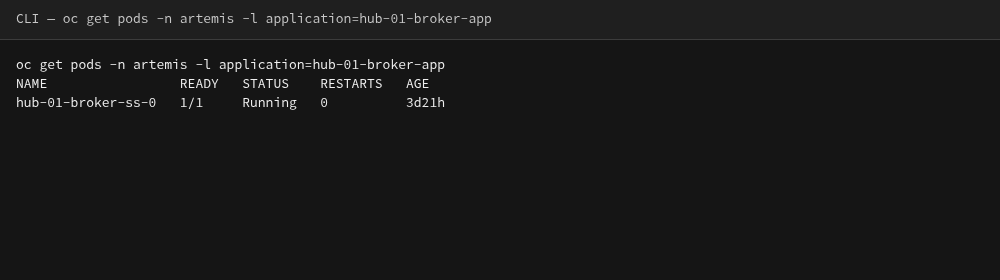
oc get pods -n artemis -l application=hub-01-broker-appNAME READY STATUS RESTARTS AGE
hub-01-broker-ss-0 1/1 Running 0 3d21hAGE differs. The pod is Running and 1/1 Ready even when the ActiveMQArtemis CR is not Ready (see step 3).
2. Hub still has colocated spoke-* brokers
The hub namespace also has spoke-01 / spoke-02 brokers. Those are not the ACM edge brokers. Leave them alone.
oc get pods -n artemis -l ActiveMQArtemisNAME READY STATUS RESTARTS AGE
hub-01-broker-ss-0 1/1 Running 0 3d21h
spoke-01-broker-ss-0 1/1 Running 0 3d22h
spoke-02-broker-ss-0 1/1 Running 0 3d22hspoke-01 / spoke-02 here are hub-colocated. The NY/NJ exercise brokers run on the SNOs. You cannot list those pods as user1. Use policy status instead:
oc get policy -n edge-broker-policiesNAME REMEDIATION ACTION COMPLIANCE STATE AGE
policy-amq-broker-operator-sno enforce Compliant 3d22h
policy-amq-broker-spoke-01 enforce Compliant 3d22h
policy-amq-broker-spoke-02 enforce Compliant 3d22h
policy-block-spoke-01-federation enforce 3d21h
policy-sno-uwl-amq-metrics enforce Compliant 2d21hpolicy-amq-broker-operator-sno, spoke-01, and spoke-02 should be Compliant. Only NY and NJ spokes are configured on east. policy-block-spoke-01-federation stays blank (disabled) until Module 6. policy-sno-uwl-amq-metrics is the SNO user-workload metrics allowlist (Module 8).
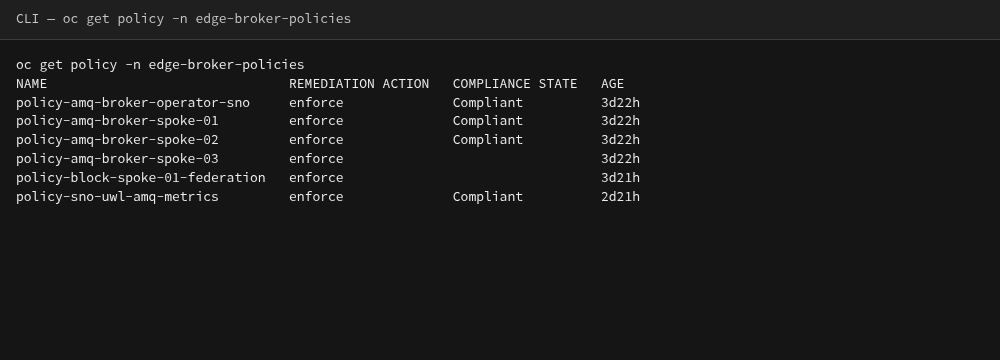
oc get policy in edge-broker-policies (not the ACM console)3. Verify hub-01 ActiveMQArtemis and AMQPS
oc get activemqartemis hub-01-broker -n artemis -o jsonpath='{.status.conditions[?(@.type=="Ready")].status}{"\n"}'
oc get route -n artemis hub-01-broker-amqps-acceptor-0-svc-rteFalseThis catalog item often shows Ready=False because BrokerPropertiesApplied is OutOfSync. The hub-01 pod can still be Running (step 1) and the AMQPS Route still exists. Do not treat that as a failed lab, and do not try to "fix" OutOfSync here. SNO→hub federation proof is Jolokia hub-01-connection started: true in step 5.
example)NAME HOST/PORT PATH SERVICES PORT TERMINATION WILDCARD
hub-01-broker-amqps-acceptor-0-svc-rte hub-01-broker-amqps-acceptor-0-svc-rte-artemis.apps.hub.example.gcp.redhatworkshops.io hub-01-broker-amqps-acceptor-0-svc amqps-acceptor-0 passthrough/None NoneThe AMQPS Route is how SNO brokers reach hub-01 (TLS passthrough on port 443). In-cluster clients still use amqp://hub-01-broker-amqp-acceptor-0-svc.artemis.svc.cluster.local:5672.
4. Open the Hub AMQ Console
This console is the regional AMQ hub (hub-01 on ACM east). Global Hub has no AMQ broker.
Navigate to the hub AMQ Console:
-
Hub: https://hub-01-broker-wconsj-0-svc-rte-artemis.apps.hub.example.gcp.redhatworkshops.io
-
Login:
admin/admin
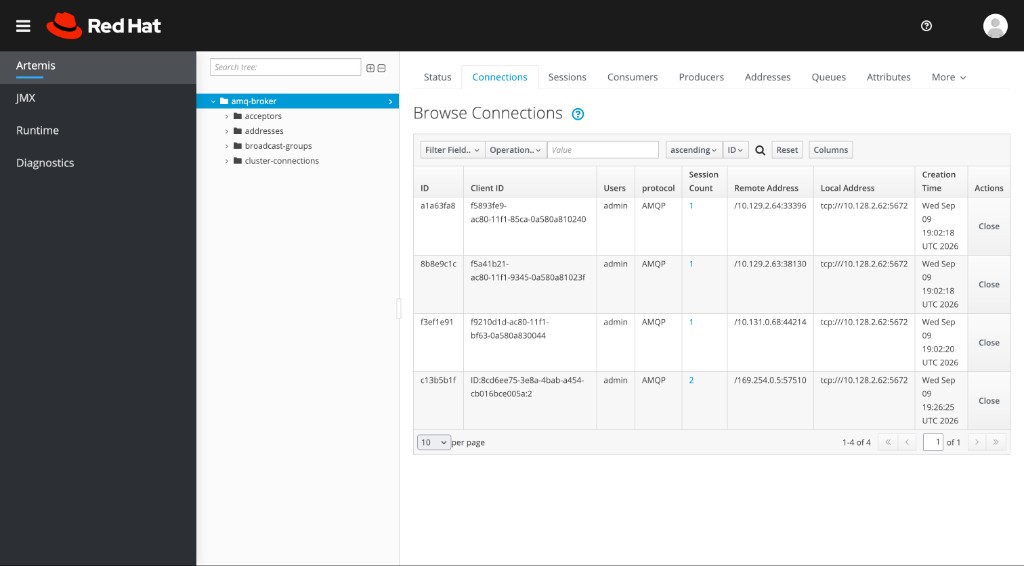
Open Connections. You should see AMQP sessions from edge brokers (UUID Client IDs, not cluster names). Hub-colocated spoke-* and SNO brokers can both appear.
-
Client ID is the remote broker’s node UUID, not
spoke-01orsno-edge-01. -
Protocol
AMQPmarks a federation session. -
The row whose Remote Address is
169.254.0.5is not a spoke. Ignore it.
Optionally open Sessions.
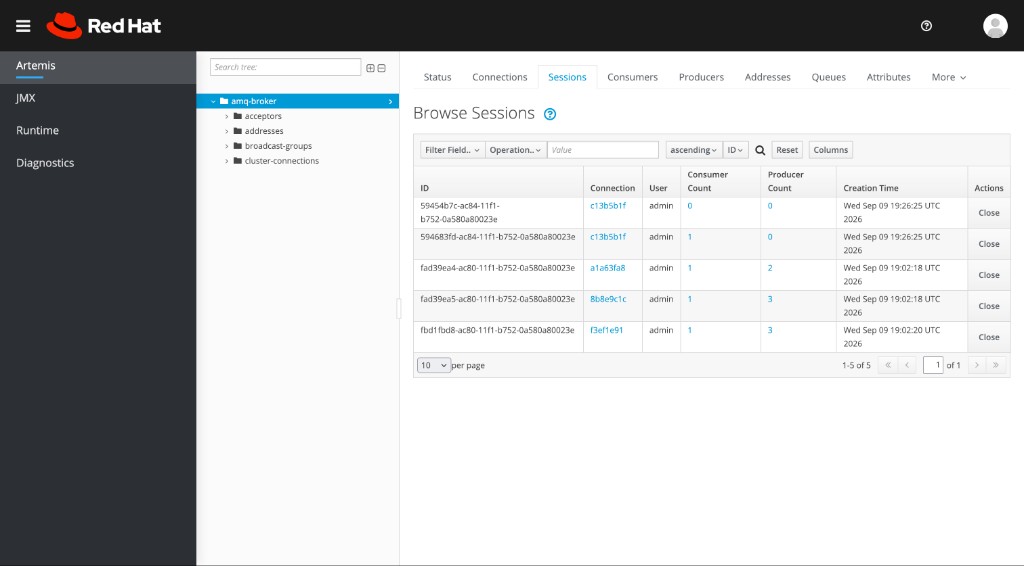
This table does not show the configured name hub-01-connection. That name lives on each SNO broker.
|
5. Verify hub-01-connection on the NY SNO broker
The NY broker console is on sno-edge-01 (not the hub ingress domain):
-
Login:
admin/admin
curl -sS -u admin:admin \
'http://spoke-01-broker-wconsj-0-svc-rte-artemis.apps.sno-edge-01.%sandbox_guid%.gcp.redhatworkshops.io/console/jolokia/exec/org.apache.activemq.artemis:broker=%22amq-broker%22/listBrokerConnections'value field)[{"name":"hub-01-connection","protocol":"AMQP","started":true}]hub-01-connection with started: true is the SNO→hub federation link. Repeat against sno-edge-02 (spoke-02-broker, apps.sno-edge-02.%sandbox_guid%.gcp.redhatworkshops.io) if you want NJ as well.