Module 2: Provision SNOs and Observe ACM Edge Brokers
Objectives
-
Confirm SNO edge clusters are JOINED (provision with Hive only if they are missing)
-
See RHACM Governance install AMQ on those SNOs (
edge-broker-policies) -
Confirm
ztp-policiesstays unbound (no ApplicationSet children)
Background
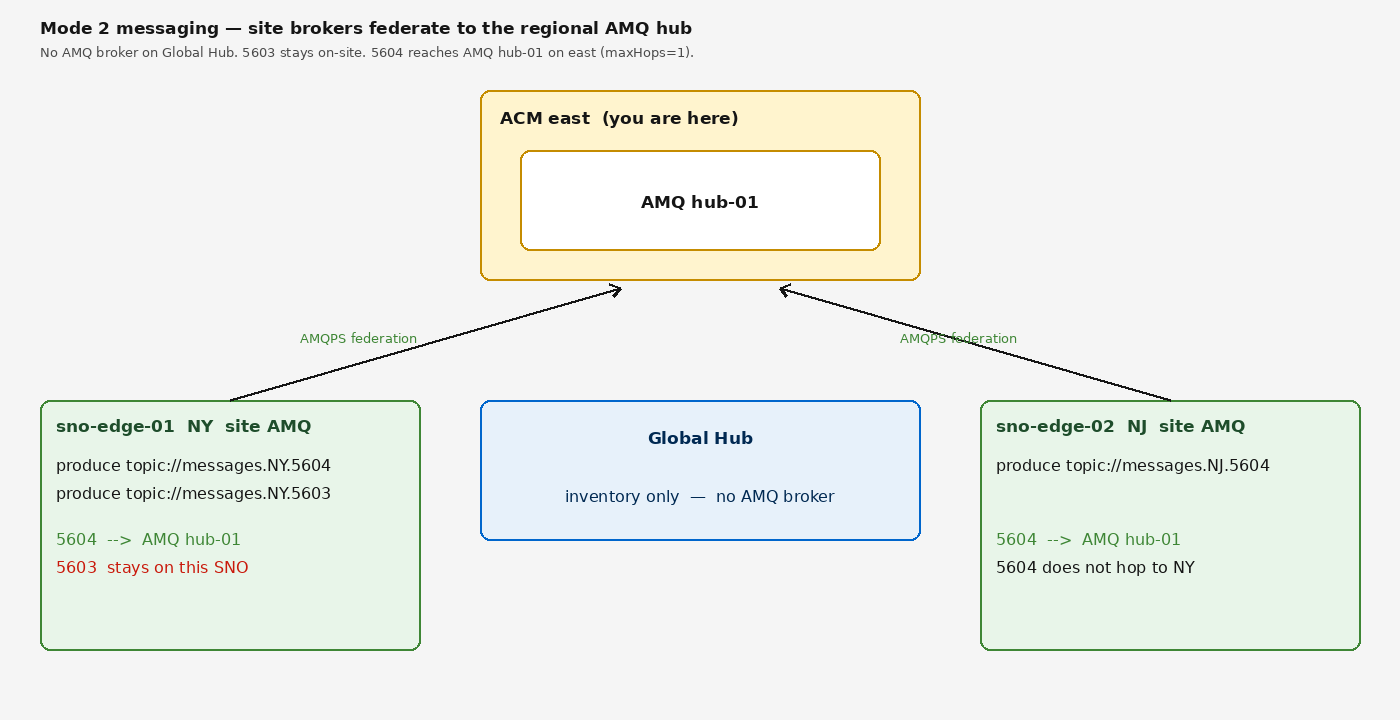
Hive (via RHACM) can provision SNO edge clusters on GCP. After a cluster joins with labels sites: edge-sno, fleet: amq, and edge-region: NY|NJ|CT, ACM ConfigurationPolicies in namespace edge-broker-policies install the AMQ Broker operator and one ActiveMQArtemis per region. Those SNO brokers federate to hub-01 over AMQPS.
You are adding a SNO under regional ACM east; it never talks to Global Hub. After join, Global Hub inventory lists the site under this managed hub. Federation is to the AMQ hub broker on this regional ACM hub (hub-01, address classes 5603–5607). Preview of the required produce path (messages.NY.5604 / messages.NY.5603) is Module 4 and Module 5.
|
On-premises bare-metal provisioning
This lab provisions SNOs on GCP using On physical hardware, SNO provisioning uses the Assisted Installer (USB, Redfish virtual media, or iPXE) instead of Hive. A Baseboard Management Controller (BMC) with Redfish support is required for virtual media provisioning. See Scale and Production Considerations for full details. |
The ApplicationSet artemis-edge-workloads in ztp-policies is intentionally unbound. Binding it would sync the full hub Helm chart to every SNO.
AgnosticD did not create SNOs. oc get managedcluster should show only local-cluster until you run deploy-spokes.sh on this regional hub.
|
Steps
1. Create GCP Credential in RHACM Console
Open the RHACM Console and create a cloud provider credential. This stores your GCP service account, pull secret, SSH keys, and base domain in a single ACM-managed secret.
-
Navigate to Infrastructure → Credentials → Add credential
-
Select Google Cloud Platform as the provider type
-
Set:
-
Credential name:
gcp-credentials -
Namespace:
gcp-credentials(create new)
-
-
Upload your GCP service account JSON key (or paste its contents)
-
Enter your Base DNS domain:
example.gcp.redhatworkshops.io -
Paste your Red Hat pull secret (from https://console.redhat.com/openshift/install/pull-secret)
-
Paste your SSH public and private keys
-
Click Add
Verify the credential was created:
oc get secret gcp-credentials -n gcp-credentials -o jsonpath='{.metadata.labels.cluster\.open-cluster-management\.io/type}'gcp2. Run the Provisioning Script
The script extracts credentials from the ACM secret you just created and automates the entire Hive provisioning pipeline.
|
The provisioning script requires cluster-admin access. Verify before running: You should see your user or service account name, and |
./scripts/deploy-spokes.sh --clusters 2The script performs these steps automatically:
-
Pre-flight checks — verifies
oclogin, Hive pods, ClusterImageSet, ArgoCD app -
Credential extraction — reads GCP key, pull secret, and SSH keys from the ACM credential (or bastion files)
-
Secret creation — creates per-spoke namespaces with
gcp-creds,pull-secret, andssh-private-keysecrets -
ArgoCD patch — enables
spokeProvisioningin the Helm values, which creates:-
ClusterDeploymentCRs (triggers Hive provisioning) -
ManagedClusterCRs (auto-imports clusters into RHACM) -
KlusterletAddonConfigCRs (enables ACM add-ons) -
RHACM Policies in
edge-broker-policies(AMQ operator + per-region broker + federation)
-
-
Hive monitoring — polls
ClusterDeploymentsevery 60 seconds until installed
| Cluster | Region | GCP Machine Type |
|---|---|---|
sno-edge-01 |
NY |
n2-standard-8 |
sno-edge-02 |
NJ |
n2-standard-8 |
First pass is two SNOs on east only. Central and west stay empty until a later lab.
| Spoke cluster provisioning takes approximately 30-45 minutes per cluster. All clusters provision in parallel. |
3. Monitor Provisioning Progress
While the script monitors automatically, you can also watch from a second terminal:
oc get clusterdeployments -A -o custom-columns=NAME:.metadata.name,INSTALLED:.spec.installed,PLATFORM:.spec.platform.gcp.regionOr use the watch flag for continuous updates:
oc get clusterdeployments -A -w| You can proceed to Module 3: Verify AMQ Brokers and Federation while the clusters provision. The spoke-specific AMQ brokers and federation will activate once the clusters join. |
You can also check status at any time:
./scripts/deploy-spokes.sh --status4. Verify ManagedCluster Labels
Once clusters are provisioned, they auto-register as ManagedClusters:
oc get managedcluster -o custom-columns=NAME:.metadata.name,REGION:.metadata.labels.edge-region,PROVIDER:.metadata.labels.cloud-provider,AVAILABLE:.status.conditions[0].statusNAME REGION PROVIDER AVAILABLE
local-cluster <none> <none> True
sno-edge-01 NY gcp True
sno-edge-02 NJ gcp TrueEach spoke cluster shows its assigned edge region and gcp cloud provider label.
5. Check Placement Decisions (edge-broker-policies)
AMQ on SNOs is selected by Placement in edge-broker-policies, not ztp-policies.
oc get placement -n edge-broker-policiesNAME SUCCEEDED REASON SELECTEDCLUSTERS
policy-amq-broker-operator-sno-placement True AllDecisionsScheduled 2
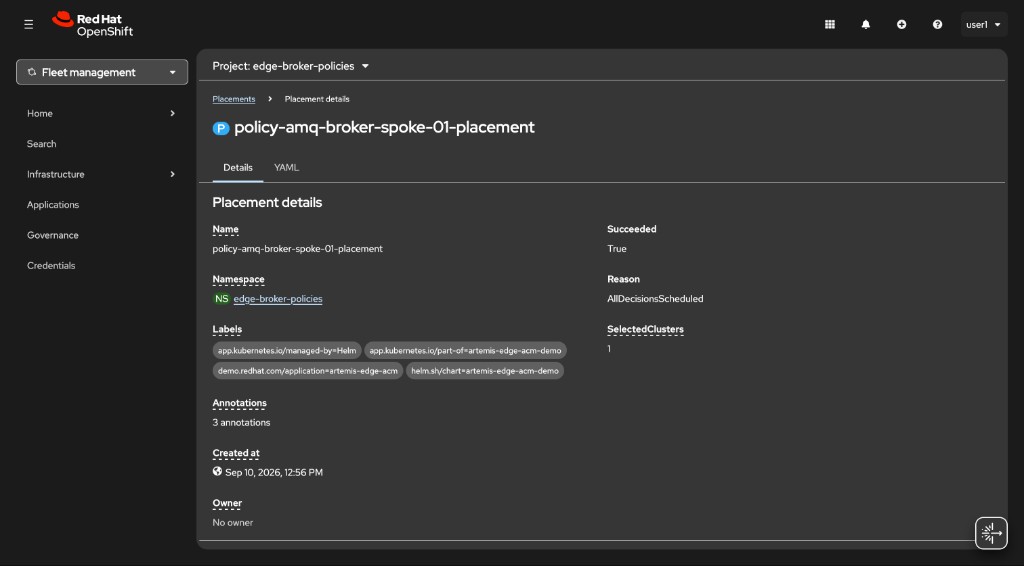
policy-amq-broker-spoke-01-placement True AllDecisionsScheduled 1
policy-amq-broker-spoke-02-placement True AllDecisionsScheduled 1First pass is NY and NJ on east only. A CT spoke-03 placement appears only if configured in edgeBrokers[].
Confirm ztp-policies is not bound:
oc get placement -n ztp-policiesThose Placements show NoManagedClusterSetBindings. That is expected. Do not create a ManagedClusterSetBinding in ztp-policies.
6. Verify RHACM Policies (AMQ on SNOs)
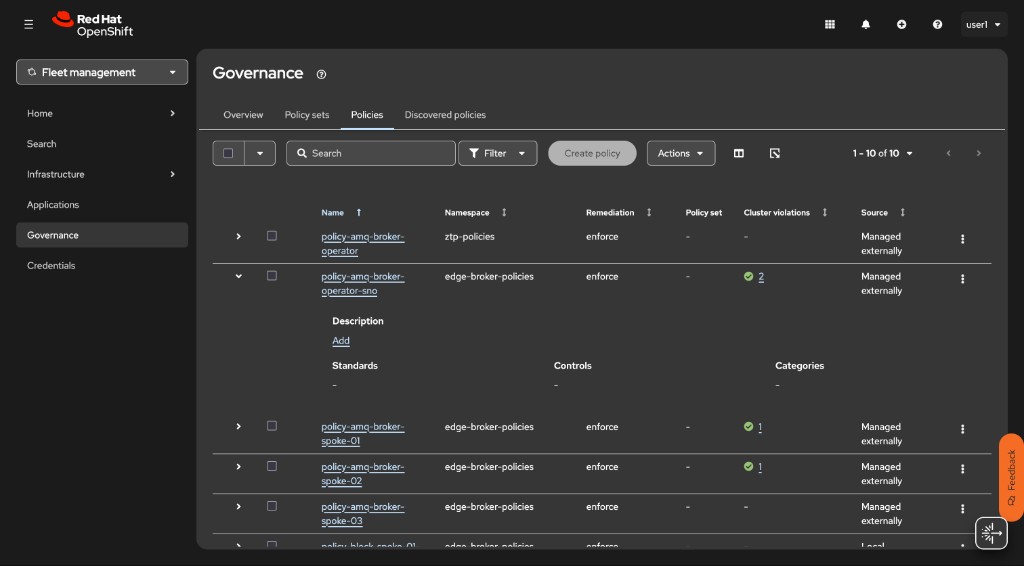
These Policy objects were not written by hand. The hub Helm chart (templates/edge-broker-policies.yaml, synced by ArgoCD field-content) rendered one Policy + Placement per edgeBrokers[] entry. Inspect the live objects in the CLI or in ACM Governance. For hundreds of sites you would not grow values.yaml — use PolicyGenerator with cluster labels and fromClusterClaim instead. Do not apply ztp/policygenerator/ in this lab; it would collide with the Helm policies already on the hub.
Open ACM in the OpenShift console (the old multicloud-console host is not used on this catalog item). Go to Governance → Policies, or open Governance ↗, or run:
oc get policy -n edge-broker-policiesNAME REMEDIATION ACTION COMPLIANCE STATE
policy-amq-broker-operator-sno enforce Compliant
policy-amq-broker-spoke-01 enforce Compliant
policy-amq-broker-spoke-02 enforce Compliant
policy-block-spoke-01-federation enforce
policy-sno-uwl-amq-metrics enforce CompliantOnly spoke-01 (NY) and spoke-02 (NJ) are configured on east. policy-block-spoke-01-federation stays disabled until Module 6. policy-sno-uwl-amq-metrics is the SNO user-workload metrics allowlist (Module 8).
-
policy-amq-broker-operator-sno— Namespace, OperatorGroup, and AMQ Broker Subscription on everysites: edge-snocluster -
policy-amq-broker-spoke-01/spoke-02— oneActiveMQArtemisper region, with AMQP federation to hub-01 -
policy-block-spoke-01-federation— stays disabled until Module 6
See which clusters each broker policy hit:
oc get policy policy-amq-broker-spoke-01 -n edge-broker-policies -o jsonpath='{range .status.status[*]}{.clustername} {.compliant}{"\n"}{end}'sno-edge-01 CompliantYou cannot oc login to the SNOs as user1. Policy status on the hub is how you confirm AMQ landed on the edge.
7. Troubleshooting
If a cluster is stuck provisioning, check the ClusterDeployment conditions:
oc get clusterdeployment sno-edge-01 -n sno-edge-01 -o yaml | grep -A 10 conditionsCheck the provisioning pod logs:
oc logs -n sno-edge-01 -l hive.openshift.io/cluster-deployment-name=sno-edge-01 --tail=50Common issues:
-
GCP quota exceeded — ensure n2-standard-8 vCPU quota allows concurrent SNO installs (8 vCPUs per cluster)
-
DNS zone not found — verify the base domain matches your GCP sandbox DNS zone
-
Credential error — re-check the GCP service account JSON in the RHACM credential
To tear down spoke clusters and start over:
./scripts/deploy-spokes.sh --destroy