Module 4: AMQ Applications Overview and Deployment
Objectives
-
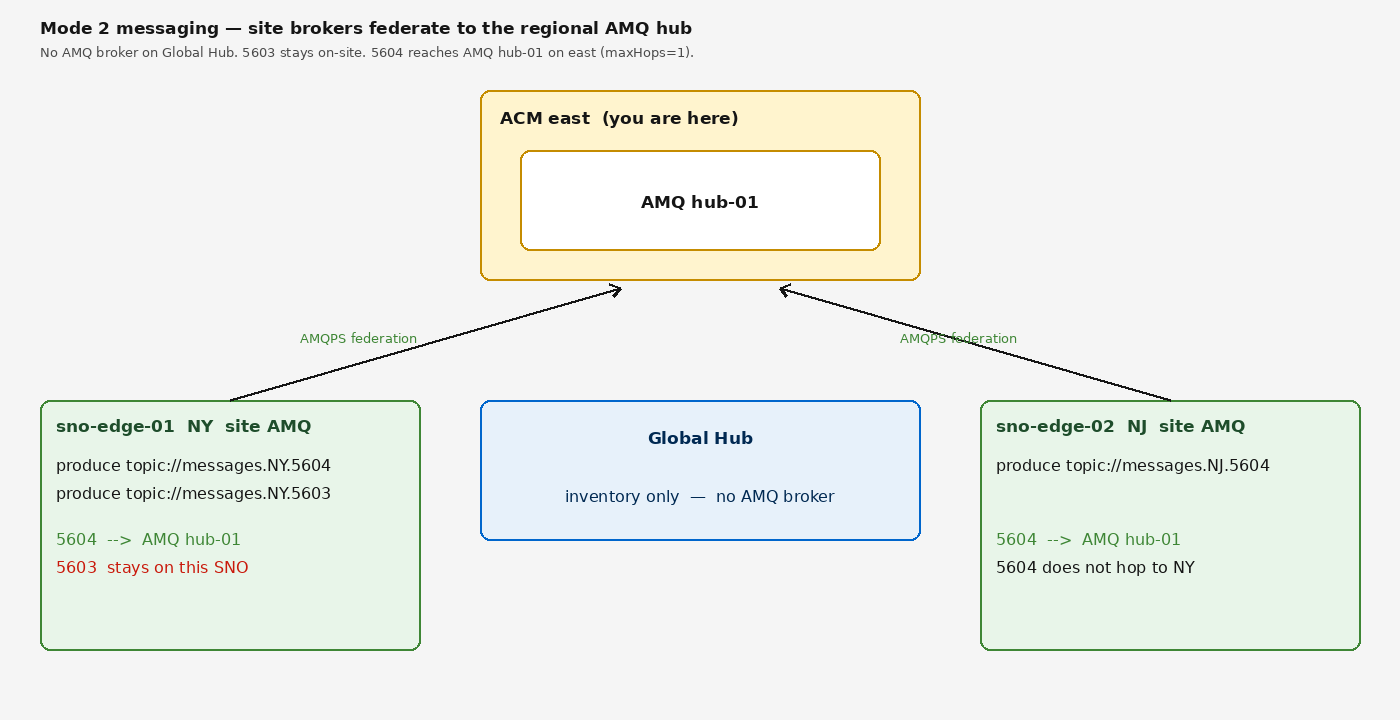
See how messages move from an ACM-managed SNO broker to hub-01
-
Produce test messages on the NY SNO (AMQPS Route), not the hub-colocated
spoke-01service -
Optionally clone and compile the Java clients (not required)
Address classes (5603–5607)
Apps pick messages.{REGION|ALL}.{class}. Federation is to the regional AMQ hub (hub-01 on this ACM east cluster). Global Hub is not on the messaging path.
| Class | Meaning |
|---|---|
5603 |
Stays on the SNO ( |
5604 |
SNO and this region’s AMQ hub only ( |
5605 |
SNO to SNO via the regional AMQ hub |
5606 |
Regional AMQ hub to all SNOs in this region ( |
5607 |
Regional AMQ hub to one SNO ( |
Application Overview
The demo includes four Java applications. You do not need to build or deploy them to complete this module. The required exercise uses the AMQ Broker image already on the hub, connecting out to the SNO AMQPS Route.
amqp-client (Quarkus Camel AMQP)
The primary producer/consumer used throughout the demo. Supports mode=producer|consumer, configurable uri and address.
mqtt-client (Quarkus Camel MQTT5)
Demonstrates multi-protocol edge messaging. MQTT messages land on the local broker and are forwarded via AMQP federation to the hub.
Produce on the NY SNO (required)
This is the ACM edge path: user1 runs a producer pod on the hub whose AMQP URL is the sno-edge-01 AMQPS Route. OpenShift Routes require TLS (SNI). The SNO broker authenticates admin / admin (workshop JAAS users are on the hub, not the SNO).
oc -n artemis run producer -ti \
  --image=registry.redhat.io/amq7/amq-broker-rhel9:7.14 \
  --rm=true --restart=Never -- /bin/bash
Inside the container:
The required destination is topic://messages.NY.5604 so the message reaches AMQ hub-01 on this regional ACM hub. maxHops=1 keeps it off the other SNO. Proving messages.NY.5603 stays on-site is Module 5.
/opt/amq/bin/artemis producer \
  --url='amqps://spoke-01-broker-amqps-acceptor-0-svc-rte-artemis.apps.sno-edge-01.%sandbox_guid%.gcp.redhatworkshops.io:443?sslEnabled=true&transport.trustAll=true&transport.verifyHost=false&useTopologyForLoadBalancing=false' \
  --protocol=AMQP --user=admin --password=admin \
  --message-count=10 --message='hello from NY SNO' \
--destination=topic://messages.NY.5604 --verboseProducer messages.NY.5604, thread=0 Sent: hello from NY SNO
Producer messages.NY.5604, thread=0 Sent: hello from NY SNO
Producer messages.NY.5604, thread=0 Sent: hello from NY SNO
Producer messages.NY.5604, thread=0 Sent: hello from NY SNO
Producer messages.NY.5604, thread=0 Sent: hello from NY SNO
Producer messages.NY.5604, thread=0 Sent: hello from NY SNO
Producer messages.NY.5604, thread=0 Sent: hello from NY SNO
Producer messages.NY.5604, thread=0 Sent: hello from NY SNO
Producer messages.NY.5604, thread=0 Sent: hello from NY SNO
Producer messages.NY.5604, thread=0 Sent: hello from NY SNO
Producer messages.NY.5604, thread=0 Produced: 10 messagesElapsed-time lines differ every run. Consuming these messages on hub-01 is Module 5 (start the consumer before producing).
Do not use amqp://spoke-01-broker-amqp-acceptor-0-svc.artemis.svc.cluster.local:5672. That service is the hub-colocated broker, not the SNO.
Build the Java clients (optional)
Skip this section unless you want to compile the sample clients. It is not required to understand hub and spoke federation.
If you did not clone the repo in Module 0:
git clone https://github.com/tosin2013/artemis-edge-acm-demo.git
cd artemis-edge-acm-demo
Point Maven at the writable PVC (see Module 0). export HOME alone is not enough: Java user.home is /data. Do not use -Dquarkus.container-image.build=true unless this terminal has podman or Docker.
export HOME=/home/lab-user
export JAVA_TOOL_OPTIONS="-Duser.home=/home/lab-user"
export MAVEN_OPTS="-Dmaven.repo.local=/home/lab-user/.m2/repository"
mkdir -p /home/lab-user/.m2
cd java/amqp-client
mvn package -DskipTests
cd ../mqtt-client
mvn package -DskipTests
cd ../amqp-bridge
mvn package -DskipTests