Module 04: Application Lifecycle
In this exercise you will deploy a demo application onto the cluster using Red Hat Advanced Cluster Management for Kubernetes and OpenShift GitOps (ArgoCD). You will manage application versions across environments and use cluster labels to configure placement mechanisms.
The application manages two environment versions — development and production. Both are deployed as a single Helm chart using an ArgoCD ApplicationSet, with environment-specific values.yaml files driving the differences. The ApplicationSet iterates over value directories and creates an application instance for each one.
ArgoCD Integration
This section walks through deploying an application using ArgoCD integrated with RHACM. You will install ArgoCD, connect it to RHACM’s cluster inventory, and deploy a multi-environment application using an ApplicationSet.
ArgoCD Installation
An ArgoCD / OpenShift GitOps instance must be installed before beginning the integration with RHACM. Install the openshift-gitops operator using the script below.
git clone https://github.com/tosin2013/sno-quickstarts.git
cd sno-quickstarts/gitops
./deploy.sh|
Troubleshooting:
deploy.sh errors or ArgoCD pods stuck in PendingThe ArgoCD CR fails to apply (webhook not ready) If you see errors like ArgoCD pods stuck in Pending ("Too many pods") On SNO clusters with many operators installed, the default If you see After the node returns, the pending pods will schedule automatically. |
Make sure that the ArgoCD instance is running by navigating to ArgoCD’s web UI. The URL can be found by running:
<hub> $ oc get route openshift-gitops-server -n openshift-gitops -o jsonpath='{.spec.host}{"\n"}'You can also find the route in the OpenShift Console under Networking → Routes in the openshift-gitops project:
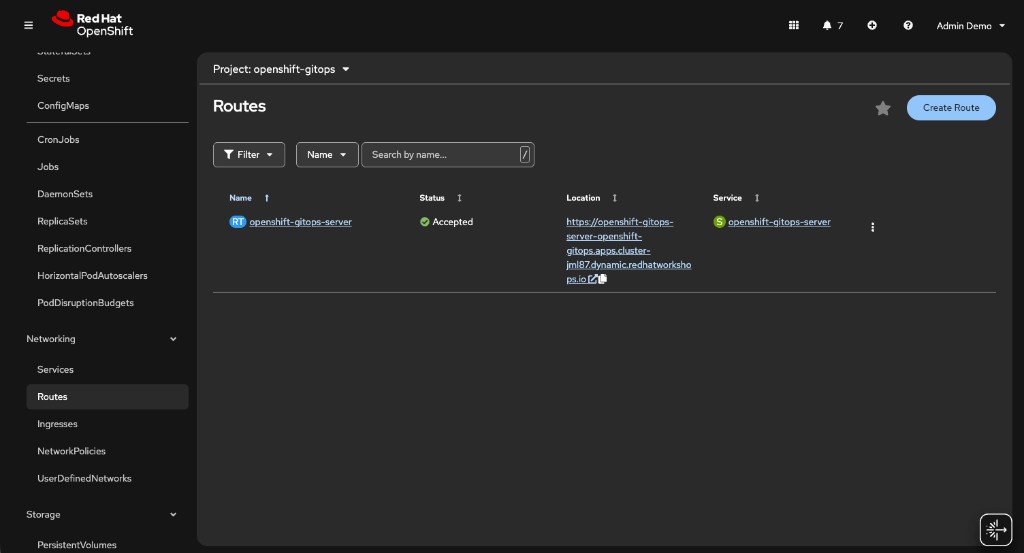
Logging into ArgoCD
Open the ArgoCD URL in your browser. You will see the ArgoCD login page:
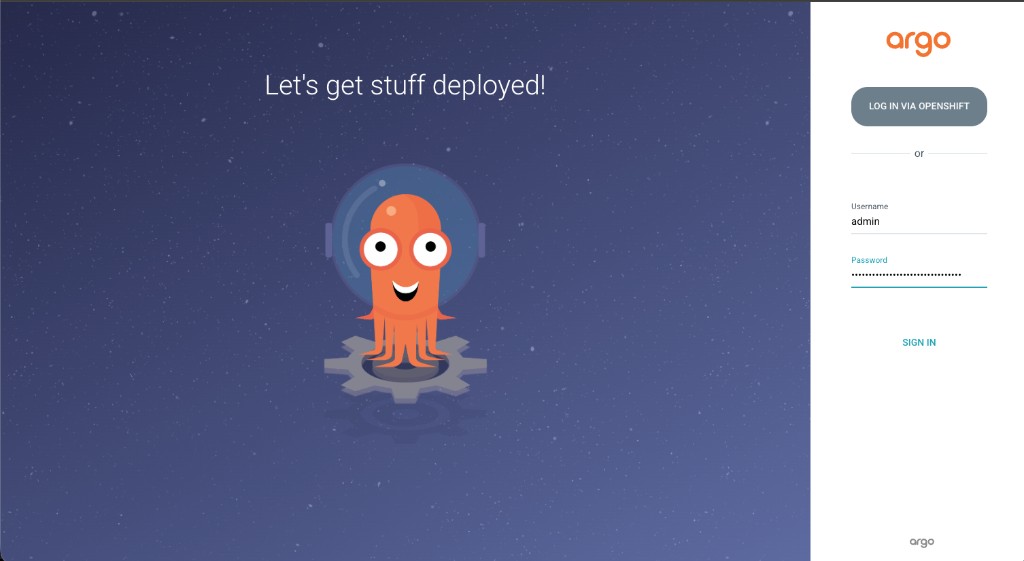
Log in using the admin username and the password stored in the openshift-gitops-cluster secret. To retrieve the password:
<hub> $ oc extract secret/openshift-gitops-cluster -n openshift-gitops --to=- --keys=admin.passwordYou can also find the password in the OpenShift Console: navigate to Workloads → Secrets in the openshift-gitops project, then click on the openshift-gitops-cluster secret:
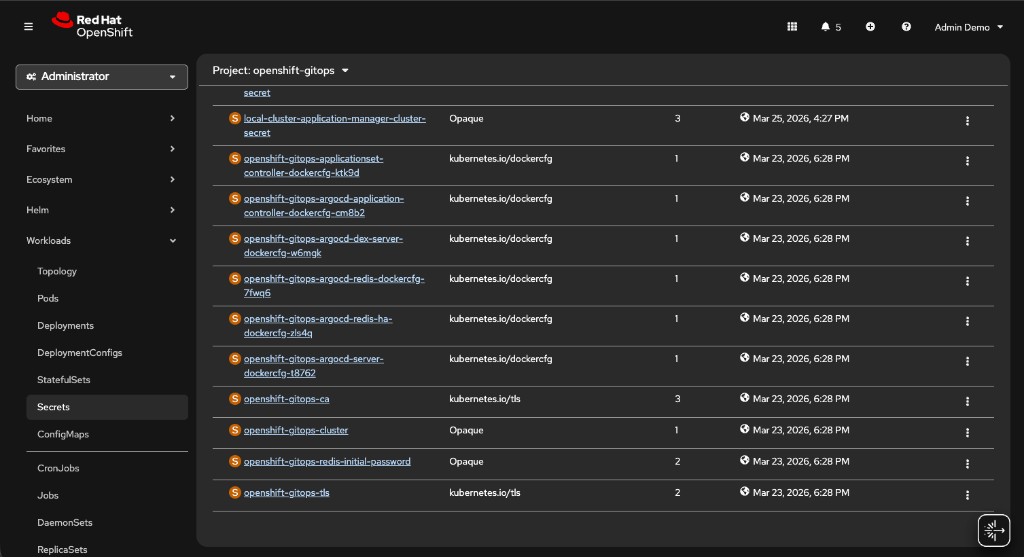
Click the secret to see its details, then click Reveal values under the Data section to see the admin.password:
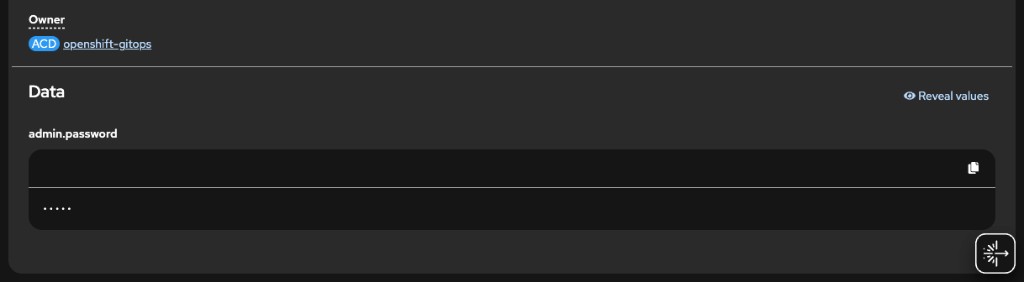
Do not use the LOG IN VIA OPENSHIFT button for this workshop. Logging in via OpenShift SSO (e.g., as kubeadmin) will not show the managed clusters in ArgoCD. You must use the admin username and password from the secret.
|
Preparing RHACM for ArgoCD Integration
In this part you will create the resources to import local-cluster and standard-cluster into ArgoCD’s managed clusters.
Create the next ManagedClusterSet resource. The ManagedClusterSet resource will include both clusters. The ManagedClusterSet resource is associated with the openshift-gitops namespace.
<hub> $ cat >> managedclusterset.yaml << EOF
---
apiVersion: cluster.open-cluster-management.io/v1beta2
kind: ManagedClusterSet
metadata:
  name: all-clusters
EOF

<hub> $ oc apply -f managedclusterset.yaml
Now, import both local-cluster and standard-cluster into the ManagedClusterSet resource. Importation will be done by adding the cluster.open-cluster-management.io/clusterset: all-clusters label to each ManagedCluster resource -
<hub> $ oc label managedcluster local-cluster cluster.open-cluster-management.io/clusterset=all-clusters --overwrite
<hub> $ oc label managedcluster standard-cluster cluster.open-cluster-management.io/clusterset=all-clusters --overwrite
Create the ManagedClusterSetBinding resource to bind the all-clusters ManagedClusterSet to the openshift-gitops namespace. Creating the ManagedClusterSetBinding resource will allow ArgoCD to access cluster information and import it into its management stack.
<hub> $ cat >> managedclustersetbinding.yaml << EOF
---
apiVersion: cluster.open-cluster-management.io/v1beta2
kind: ManagedClusterSetBinding
metadata:
  name: all-clusters
  namespace: openshift-gitops
spec:
  clusterSet: all-clusters
EOF

<hub> $ oc apply -f managedclustersetbinding.yaml
Create the Placement resource and bind it to all-clusters ManagedClusterSet. Note that you will not be using any special filters in this exercise.
<hub> $ cat >> placement.yaml << EOF
---
apiVersion: cluster.open-cluster-management.io/v1beta1
kind: Placement
metadata:
  name: all-clusters
  namespace: openshift-gitops
spec:
  clusterSets:
    - all-clusters
EOF

<hub> $ oc apply -f placement.yaml
Create the GitOpsCluster resource to indicate the location of ArgoCD and the placement resource -
<hub> $ cat >> gitopscluster.yaml << EOF
---
apiVersion: apps.open-cluster-management.io/v1beta1
kind: GitOpsCluster
metadata:
  name: gitops-cluster
  namespace: openshift-gitops
spec:
  argoServer:
    cluster: local-cluster
    argoNamespace: openshift-gitops
  placementRef:
    kind: Placement
    apiVersion: cluster.open-cluster-management.io/v1beta1
    name: all-clusters
EOF

<hub> $ oc apply -f gitopscluster.yaml
Make sure that both local-cluster and standard-cluster are imported into ArgoCD. In ArgoCD’s web UI, on the left menu bar, navigate to Manage your repositories, projects, settings → Clusters. You should see both clusters in the cluster list.
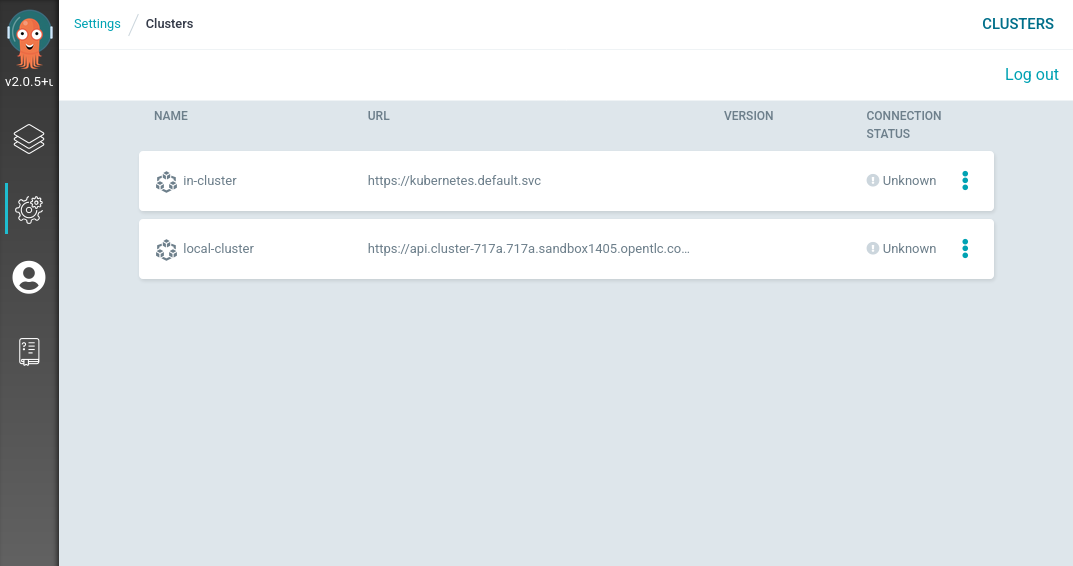
Deploying an ApplicationSet using ArgoCD
Now that you integrated ArgoCD with RHACM, let’s deploy an ApplicationSet resource using ArgoCD. The applications you’re going to create are based on a single helm chart that serves two environments — development and production.
The applications use the same baseline Kubernetes resources at - exercise-argocd/application-resources/templates, but they use different values files at - exercise-argocd/application-resources/values. Each instance of the application uses a separate values set. The ApplicationSet resource iterates over the directories in the exercise-argocd/application-resources/values directory and creates an instance of an application for each directory name.
To create the ApplicationSet resource run the next commands -
<hub> $ oc apply -f https://raw.githubusercontent.com/tosin2013/rhacm-workshop/master/04.Application-Lifecycle/exercise-argocd/argocd-resources/appproject.yaml

<hub> $ oc apply -f https://raw.githubusercontent.com/tosin2013/rhacm-workshop/master/04.Application-Lifecycle/exercise-argocd/argocd-resources/applicationset.yaml
Note that two application instances have been created. In the RHACM portal, navigate to Applications → webserver to see the ApplicationSet topology:
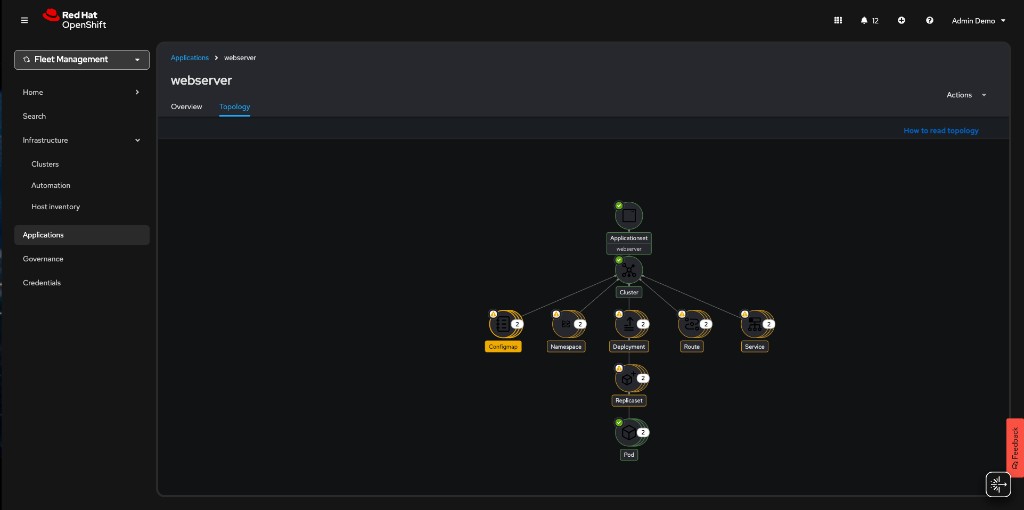
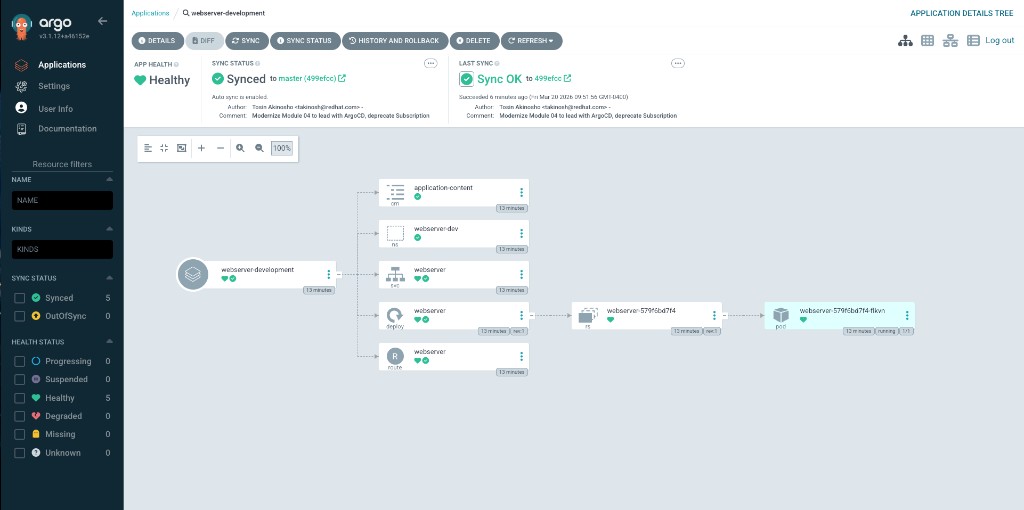
In the ArgoCD UI, you can inspect each application individually. The webserver-development application shows all resources synced and healthy:
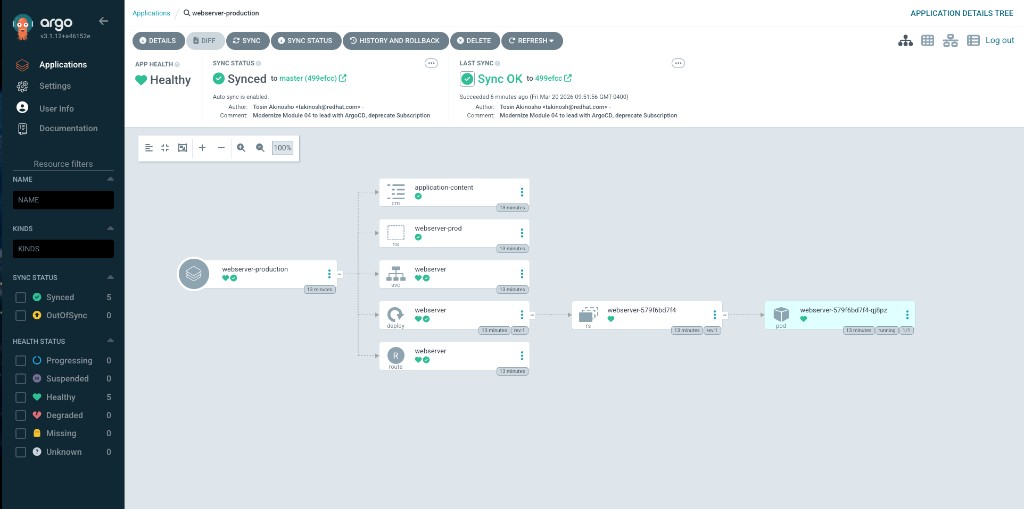
The webserver-production application mirrors the same structure in its own namespace:
Make sure that the applications are available. The applications are deployed to standard-cluster, so verify the Route resources there:
<standard-cluster> $ oc get route -n webserver-prod

NAME        HOST/PORT                              PATH                SERVICES    PORT       TERMINATION   WILDCARD
webserver   webserver-webserver-prod.apps.<FQDN>   /application.html    webserver   8080-tcp   edge          None
<standard-cluster> $ oc get route -n webserver-dev
NAME HOST/PORT PATH SERVICES PORT TERMINATION WILDCARD
webserver webserver-webserver-dev.apps.<FQDN> /application.html webserver 8080-tcp edge None
If you don’t have a kubeconfig context for standard-cluster, you can retrieve the route from the hub using RHACM search or the ArgoCD UI.
|
Navigate to each application’s route URL to verify the development and production pages display correctly.
Placement API Deep Dive
The Placement API (cluster.open-cluster-management.io/v1beta1) is the modern replacement for PlacementRule. It provides powerful cluster selection capabilities beyond simple label matching, including tolerations, prioritizers for scoring-based placement, and decision groups for progressive rollouts.
Tolerations
Clusters can have taints to prevent workloads from being scheduled to them. Placement tolerations allow specific placements to "tolerate" these taints.
Add a taint to gpu-cluster to reserve it for AI workloads only:
<hub> $ oc patch managedcluster gpu-cluster --type=merge -p '{"spec":{"taints":[{"key":"workload-type","value":"ai","effect":"NoSelect"}]}}'Create a Placement that tolerates this taint:
<hub> $ cat <<EOF | oc apply -f -
apiVersion: cluster.open-cluster-management.io/v1beta1
kind: Placement
metadata:
  name: ai-workload-placement
  namespace: rhacm-policies
spec:
  tolerations:
    - key: workload-type
      value: ai
      operator: Equal
  predicates:
    - requiredClusterSelector:
        labelSelector:
          matchLabels:
            gpu: "true"
EOF
Verify the PlacementDecision:
<hub> $ oc get placementdecision -n rhacm-policies -l cluster.open-cluster-management.io/placement=ai-workload-placement -o yamlPrioritizers (Scoring-Based Placement)
Prioritizers score clusters to determine the best placement targets. ACM provides built-in prioritizers and supports custom scoring via AddOnPlacementScores.
Create a Placement that prefers clusters with certain characteristics using built-in prioritizers:
<hub> $ cat <<EOF | oc apply -f -
apiVersion: cluster.open-cluster-management.io/v1beta1
kind: Placement
metadata:
  name: balanced-placement
  namespace: rhacm-policies
spec:
  numberOfClusters: 1
  predicates:
    - requiredClusterSelector:
        labelSelector:
          matchExpressions:
            - key: environment
              operator: In
              values:
                - dev
                - production
                - ai
  prioritizerPolicy:
    mode: Exact
    configurations:
      - scoreCoordinate:
          type: BuiltIn
          builtIn: ResourceAllocatableCPU
        weight: 3
      - scoreCoordinate:
          type: BuiltIn
          builtIn: ResourceAllocatableMemory
        weight: 1
EOF
This Placement selects the single cluster with the best combination of available CPU (weighted 3x) and available memory.
Check the placement decision:
<hub> $ oc get placementdecision -n rhacm-policies -l cluster.open-cluster-management.io/placement=balanced-placement -o jsonpath='{.items[0].status.decisions[*].clusterName}'Decision Groups (Progressive Rollout)
Decision groups allow you to organize placement decisions into groups for canary deployments or progressive rollouts:
<hub> $ cat <<EOF | oc apply -f -
apiVersion: cluster.open-cluster-management.io/v1beta1
kind: Placement
metadata:
  name: progressive-rollout
  namespace: rhacm-policies
spec:
  decisionStrategy:
    groupStrategy:
      clustersPerDecisionGroup: 1
  predicates:
    - requiredClusterSelector:
        labelSelector:
          matchExpressions:
            - key: environment
              operator: In
              values:
                - dev
                - production
                - hub
EOF
This creates separate PlacementDecision resources for each cluster, enabling staged rollout strategies with RolloutStrategy on ManifestWork or policy distribution.
Check the decision groups:
<hub> $ oc get placementdecision -n rhacm-policies -l cluster.open-cluster-management.io/placement=progressive-rolloutAppendix: Legacy Subscription Model (Deprecated)
|
The Application Subscription model (Channel, Subscription, PlacementRule) is deprecated since ACM 2.13. The sections below are preserved as a reference for legacy environments. For new deployments, use the ArgoCD integration described above. |
The legacy model deploys applications using Channel, Subscription, Placement, and Application resources. Two versions of the application are managed:
-
Development - dev branch
-
Production - master branch
Both versions are stored in the same Git repository. The production version is in the master branch and the development version is in the dev branch. The development application runs on clusters labeled environment=dev, and the production application runs on clusters labeled environment=production.
Creating the Subscription Resources
-
Namespace - Create a namespace for the custom resources on the hub.
<hub> $ cat >> namespace.yaml << EOF
---
apiVersion: v1
kind: Namespace
metadata:
  name: webserver-acm
EOF

<hub> $ oc apply -f namespace.yaml-
Channel - Create a channel that refers to the GitHub repository.
<hub> $ cat >> channel.yaml << EOF
---
apiVersion: apps.open-cluster-management.io/v1
kind: Channel
metadata:
  name: webserver-app
  namespace: webserver-acm
spec:
  type: Git
  pathname: https://github.com/tosin2013/rhacm-workshop.git
EOF

<hub> $ oc apply -f channel.yaml-
Placement - Create a Placement for environment=dev clusters.
<hub> $ cat >> placementrule-dev.yaml << EOF
---
apiVersion: cluster.open-cluster-management.io/v1beta1
kind: Placement
metadata:
  name: dev-clusters
  namespace: webserver-acm
spec:
  predicates:
    - requiredClusterSelector:
        labelSelector:
          matchLabels:
            environment: dev
EOF

<hub> $ oc apply -f placementrule-dev.yaml-
Subscription - Create a subscription binding the Placement and Channel for the dev branch.
<hub> $ cat >> subscription-dev.yaml << EOF
---
apiVersion: apps.open-cluster-management.io/v1
kind: Subscription
metadata:
  name: webserver-app-dev
  namespace: webserver-acm
  labels:
    app: webserver-app
  annotations:
    apps.open-cluster-management.io/github-path: 04.Application-Lifecycle/exercise-application/application-resources
    apps.open-cluster-management.io/git-branch: dev
spec:
  channel: webserver-acm/webserver-app
  placement:
    placementRef:
      kind: Placement
      name: dev-clusters
EOF

<hub> $ oc apply -f subscription-dev.yaml-
Application - Create an Application resource to aggregate subscriptions.
<hub> $ cat >> application.yaml << EOF
---
apiVersion: app.k8s.io/v1beta1
kind: Application
metadata:
  name: webserver-app
  namespace: webserver-acm
spec:
  componentKinds:
  - group: apps.open-cluster-management.io
    kind: Subscription
  descriptor: {}
  selector:
    matchExpressions:
    - key: app
      operator: In
      values:
      - webserver-app
EOF

<hub> $ oc apply -f application.yaml
After the resources are created, navigate to Applications → webserver-app in the RHACM portal. Verify the deployment by running:
<managed> $ oc get route -n webserver-acm
<managed> $ oc get pods -n webserver-acm
To add a production subscription, create a Placement for environment=production and a corresponding Subscription on the master branch. Switch cluster labels between environment=dev and environment=production to observe the application version change.
|
All of the legacy resources are available in the git repository. They can be created by running: |
<hub> $ oc apply -f https://raw.githubusercontent.com/tosin2013/rhacm-workshop/master/04.Application-Lifecycle/exercise-application/rhacm-resources/application.yaml